

Businesses are spending big on AI assistants. The goal is simple: help teams work faster and smarter.
Two names come up again and again. Microsoft Copilot and Claude.
Both are powerful. Both are built on advanced AI. But they are made for different jobs.
Pick the wrong one, and you risk wasting money. You also risk low adoption, where staff simply don’t use the tool.
This guide will help you choose. We’ll cover the key differences, features, pricing, security, and Microsoft 365 integration. By the end, you’ll know which AI fits your business best.
Quick Comparison: Microsoft Copilot vs Claude
Here’s a fast look at how the two stack up.
| Feature | Microsoft Copilot | Claude |
|---|---|---|
| Best For | Microsoft 365 users | Long-form reasoning & document analysis |
| Ecosystem | Microsoft | Cross-platform |
| Office Integration | Native | Limited |
| Enterprise Security | Strong Microsoft controls | Enterprise options available |
| AI Models | Microsoft/OpenAI-powered, with Anthropic models in some areas | Anthropic Claude models |
| Custom AI Agents | Via Copilot Studio | Via Claude API and integrations |
| Team Collaboration | Native in Microsoft apps | External integrations |
Quick Recommendation
Choose Microsoft Copilot if… your team already uses Word, Excel, Outlook, and Teams every day.
Choose Claude if… You need deep reasoning, long-document analysis, and flexibility across many platforms.
What Is Microsoft Copilot?
Microsoft Copilot is an AI assistant built into the Microsoft ecosystem.
It lives inside Microsoft 365 apps like Word, Excel, PowerPoint, Outlook, and Teams. You don’t switch tools. The AI is right there as you work.
Copilot is focused on productivity. It can draft emails, build slides, summarize meetings, and analyze data. Because it connects to your company’s files and chats, its answers feel personal and relevant.
In short, Copilot is designed to help everyday work get done faster.
What Is Claude?
Claude is an AI assistant made by a company called Anthropic.
It’s a conversational AI, much like ChatGPT. But Claude is known for strong reasoning. It thinks carefully and gives detailed answers.
Claude is also great with long documents. It can read very large files in one go, like a 200-page contract or a full research paper.
You can use Claude in three main ways:
- A web app (through Claude.ai)
- An API, so developers can build it into their own tools
- An enterprise plan for larger organizations
Claude vs Microsoft Copilot: Feature Comparison
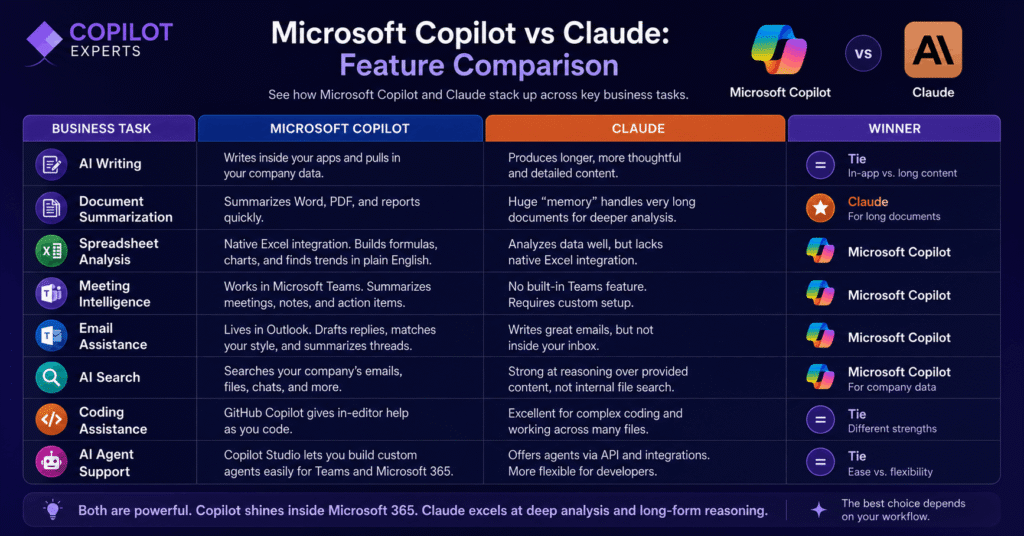
Let’s break down how they perform across common business tasks.
AI Writing
Both tools write well. They can handle emails, reports, proposals, and general content.
Copilot writes inside your apps and can pull in your company data. Claude tends to produce longer, more thoughtful pieces.
Winner: Tie. Copilot wins for in-app writing. Claude wins for long, detailed content.
Document Summarization
Need to summarize a PDF, a Word doc, or a long report? Both can help.
Claude’s edge is its huge “memory.” It can read very long documents without breaking them into chunks. This means deeper analysis, not just a quick summary.
Winner: Claude, for long documents.
Spreadsheet Analysis
Copilot connects directly to Excel. It can build formulas, create charts, and spot trends in plain English.
Claude can analyze data too, but it lacks native Excel integration.
Winner: Microsoft Copilot.
Meeting Intelligence
Copilot works inside Microsoft Teams. It can summarize meetings, capture notes, and list action items automatically.
Claude has no built-in Teams feature. You’d need a custom setup.
Winner: Microsoft Copilot.
Email Assistance
Copilot lives inside Outlook. It can draft replies, match your writing style, and summarize long threads.
Claude writes great emails, too, but not directly inside your inbox.
Winner: Microsoft Copilot.
AI Search
Copilot searches your company’s knowledge: emails, files, and chats. This is its big strength.
Claude is strong at reasoning over the content you give it. But it can’t search your internal Microsoft files on its own.
Winner: Microsoft Copilot for company data.
Coding Assistance
Both can help with code. Claude is well-regarded for complex coding and working across many files.
For Microsoft users, GitHub Copilot (a separate coding tool) offers in-editor help while you type.
Each fits a different style. Claude for deep work, GitHub Copilot for quick, in-line suggestions.
AI Agent Support
An “AI agent” is a tool that can carry out tasks on its own.
Microsoft offers Copilot Studio, where you can build custom agents. Claude offers agents through its API and integrations.
Winner: Tie. Copilot is easier for Microsoft Teams. Claude is more flexible for developers.
Read this: Microsoft Copilot vs ChatGPT
Microsoft Copilot vs Claude Pricing
Here’s a simple look at the plans.
| Plan | Microsoft Copilot | Claude |
|---|---|---|
| Free | Copilot Chat (limited) | ~30 messages/day |
| Individual | Copilot Pro, around $20/user/mo | Claude Pro, around $20/mo |
| Business | M365 Copilot Business, around $21/user/mo | Claude Team, around $30/user/mo |
| Enterprise | $30/user/mo (plus an M365 license) | Custom pricing (reportedly starting around $60/user/mo) |
Note: Pricing changes often. Always check the official Microsoft and Anthropic websites before you buy.
One key point: Copilot’s enterprise plan needs an existing Microsoft 365 license. Most large companies already pay for one, so it’s often a cheaper add-on.
Microsoft Copilot vs Claude for Business
For most businesses, the choice comes down to your daily tools.
Copilot shines at productivity. It automates work inside the apps your team already uses. It also supports easy collaboration through Microsoft Teams and SharePoint.
Claude shines at deep thinking. It’s the better pick for heavy analysis and research that happens outside the Microsoft world.
The bottom line: Copilot for workflow and productivity. Claude for reasoning and analysis.
Microsoft Copilot vs Claude for Microsoft 365 Users
Does your company run on Word, Excel, Teams, Outlook, and SharePoint?
If so, Copilot is the natural choice.
Native integration matters. It means the AI works inside your tools with no extra setup. Staff don’t have to learn new software. They just see helpful AI where they already work.
This low friction is a big deal. It often leads to higher adoption, which means a better return on your spend.
Microsoft Copilot vs Claude for Small Businesses
Small teams have different needs. Here’s how the two compare.
- Cost: Both offer affordable individual plans. Copilot’s value grows if you already pay for Microsoft 365.
- Ease of adoption: Copilot is easy if you use Office apps. Claude is easy to start with its web app.
- Learning curve: Both are simple to use. Copilot fits right into familiar tools.
- Setup: Copilot needs Microsoft licensing. Claude works straight from a browser.
- Scalability: Both can grow with you. Claude offers flexible plans, while Copilot scales across Microsoft apps.
Microsoft Copilot vs Claude for Enterprises
Large companies care about control and safety. Here’s what to weigh.
- Security: Copilot uses Microsoft’s built-in security tools. Claude offers strong enterprise options too.
- Governance: Copilot ties into Microsoft Purview for data rules. Claude provides its own controls.
- Compliance: Both hold major certifications, like SOC 2 and HIPAA.
- Identity management: Copilot uses your existing Microsoft sign-ins and permissions.
- Role-based access: Copilot respects your current file permissions. If a user can’t see a file, Copilot can’t show it.
- Integration: Copilot fits Microsoft systems easily. Claude fits well in mixed or non-Microsoft setups.
Microsoft Copilot vs Claude Security & Privacy
Security is often the deciding factor for enterprises.
Copilot inherits Microsoft 365 protections. This covers identity, permissions, data loss prevention, and compliance. Your data stays inside your Microsoft tenant, and Copilot does not train on it.
Claude also takes safety seriously. It offers enterprise controls and options like zero data retention through its API.
There’s an important detail to note. When Claude models run inside Copilot, data may route to Anthropic’s US-based servers. This can affect data residency rules in some regions.
No tool is “more secure” by default. Real security depends on how you set it up and what your business needs.
Microsoft Copilot vs Claude Performance
How do they perform day to day?
Both write to a high standard. Claude often leads with deep reasoning and handling very long documents.
Copilot leads on workflow. It’s fast inside your apps and keeps everything in one place.
For routine office tasks, Copilot feels smooth and quick. For heavy analysis, Claude’s reasoning gives it the edge.
Pros and Cons
A quick summary of each tool’s strengths and limits.
Microsoft Copilot
Advantages
- Deep Microsoft integration
- Strong for business productivity
- Connects to your company data through Microsoft Graph
- Fits the wider enterprise ecosystem
Limitations
- Best value when you already use Microsoft 365
- Some advanced features require paid plans
Claude
Advantages
- Strong reasoning and analysis
- Handles long documents and conversations well
- Flexible across many platforms
Limitations
- Less native integration with Microsoft 365
- Enterprise workflows may need extra setup
Which AI Assistant Should You Choose?
Use this simple framework to decide.
Choose Microsoft Copilot if:
- You already use Microsoft 365
- You need Word, Excel, Outlook, and Teams support
- You want AI across your whole organization
- You want AI built into daily work
Choose Claude if:
- You value long-form analysis and writing
- You need a general AI assistant across platforms
- Your work happens outside the Microsoft ecosystem
Real Business Scenarios
Sometimes examples make it clearer. Here are five common cases.
Scenario 1: Marketing Agency
They write lots of content and need creative depth. Recommendation: Claude, for strong writing and reasoning.
Scenario 2: Accounting Firm
They live in Excel and Outlook. Recommendation: Microsoft Copilot, for spreadsheet and email help.
Scenario 3: Software Company
They want deep, multi-file coding support. Recommendation: Claude, with GitHub Copilot for quick in-editor help.
Scenario 4: Enterprise IT Department
They need security, governance, and broad rollout. Recommendation: Microsoft Copilot, with Claude for power users who need deep analysis.
Scenario 5: Small Business
They want a quick, low-cost start. Recommendation: Either works. Copilot if you use Office, Claude if you want easy web access.
Why Businesses Choose Copilot Experts
Choosing a tool is one thing. Rolling it out well is another.
Copilot Experts helps organizations evaluate, set up, and improve AI across the Microsoft ecosystem.
Our Services
- Microsoft Copilot consulting
- AI readiness assessments
- Copilot adoption programs
- Microsoft 365 optimization
- AI agent development
- Workflow automation
- Licensing guidance
- Employee training
Why Choose Copilot Experts?
First call is free.
Frequently Asked Questions
Is Microsoft Copilot better than Claude?
Neither is better overall. Copilot wins for Microsoft 365 productivity. Claude wins for deep reasoning and long documents.
What’s the difference between Claude and Microsoft Copilot?
Copilot is built into Microsoft apps for daily work. Claude is a standalone AI focused on reasoning and analysis.
Which AI is better for Microsoft 365?
Microsoft Copilot. It works natively inside Word, Excel, Outlook, and Teams.
Is Claude better for writing?
Claude is excellent for long, detailed writing. Copilot is better when you want to write inside your apps using company data.
Is Microsoft Copilot better for Excel?
Yes. Copilot connects directly to Excel for formulas, charts, and data insights.
Which AI is better for Teams?
Microsoft Copilot. It summarizes meetings and creates action items right inside Teams.
Can Claude integrate with Microsoft 365?
Not natively on its own. It needs custom integration. Some Claude models are also available inside Copilot Studio.
Which AI is more secure?
Neither is automatically safer. Security depends on your setup, settings, and business rules.
Which AI is cheaper?
For Microsoft 365 users, Copilot is often the cheaper add-on. For others, Claude Pro at around $20/mo is a strong value.
Can businesses use both Microsoft Copilot and Claude?
Yes. Many do. They use Copilot for daily productivity and Claude for deep analysis.
Which AI is best for enterprise?
Copilot suits Microsoft-heavy enterprises. Claude suits teams needing advanced reasoning. Many large firms use both.
Which AI should small businesses choose?
Copilot if you rely on Office apps. Claude, if you want a quick, browser-based start.
Final Thoughts: Choose Based on Your Workflows
There’s no single winner here.
Microsoft Copilot excels for teams deeply invested in Microsoft 365. It brings AI into the apps you already use, with smooth collaboration and strong controls.
Claude stands out for advanced reasoning, long-document analysis, and cross-platform flexibility.
The right choice depends on your current tech stack, your collaboration needs, your security rules, and your goals.
So don’t pick based on features alone. Look at how your team actually works. Then choose the AI that fits that workflow best.
