
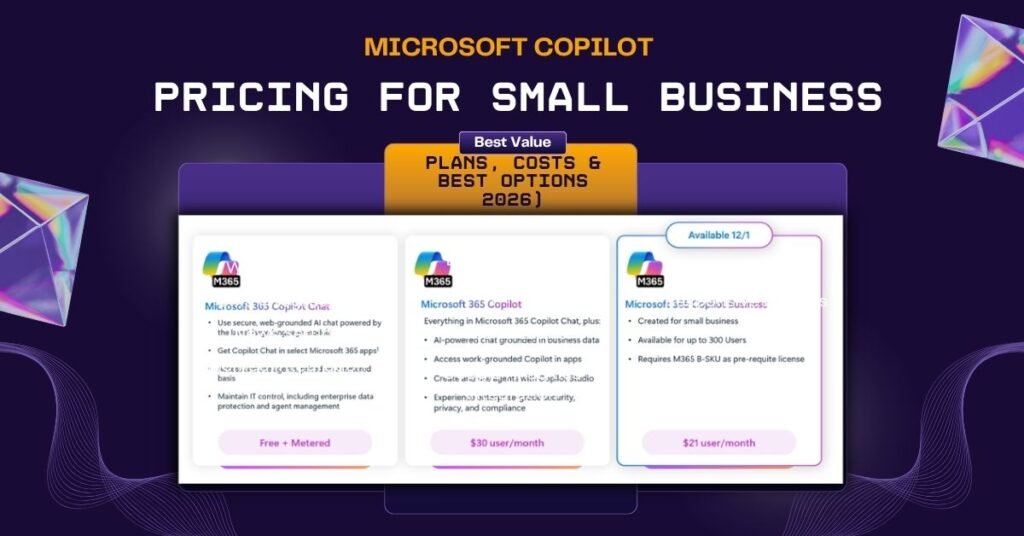
If you have searched “Microsoft Copilot pricing” recently, you already know the problem. Microsoft’s own website lists multiple plans with overlapping names, promotional rates that expire on different dates, and eligibility rules that depend on which base plan you already have. One wrong choice and you are either paying the enterprise rate for an SMB product, or you have bought a Copilot plan that your current Microsoft 365 subscription does not even qualify for.
We work with small businesses every day on Microsoft 365 implementation, and the number one question we hear is: “Which Copilot plan is actually right for us?” This guide answers that clearly — with accurate 2026 pricing, real cost examples, and honest advice on where to start.
Here is what you will get: every Copilot plan explained with verified pricing, a full comparison table, a real cost example for a 10-person team, a step-by-step plan selector, and the hidden costs most guides never mention.
Pricing note: All figures are verified as of April 2026. Microsoft has confirmed price increases effective July 1, 2026. Always verify current pricing at microsoft.com before purchasing.
What Is Microsoft Copilot and Why Are Small Businesses Adopting It?
Microsoft Copilot is an AI assistant built directly into Microsoft 365 apps — Word, Excel, PowerPoint, Outlook, and Teams. It uses natural language prompts to do things that used to take hours: drafting emails, summarising meetings, analyzing spreadsheet data, building presentation decks, and generating reports.
Small businesses are adopting it for one simple reason — it gives lean teams the output capacity of a much larger team without hiring additional headcount. The deep integration with tools your team already uses every day is what makes it genuinely practical, not just impressive in a demo.
Understanding Copilot pricing matters because Copilot is not a single product. It is a family of products with different names, costs, and eligibility rules. Picking the wrong plan is an expensive mistake — and one we see regularly.
Is Microsoft Copilot Free? Free vs Paid Explained
Microsoft offers a free version of Copilot at copilot.microsoft.com. You can use it for general AI tasks — drafting content, answering questions, and web research. It costs nothing.
The catch: the free tier does not connect to your Microsoft 365 apps. It cannot read your emails, summarise your Teams meetings, or analyze your Excel data. To get Copilot working inside the apps where your team actually spends their day, you need a paid plan.
| Feature | Copilot Free | Paid Plans |
|---|---|---|
| General AI chat | ✅ | ✅ |
| Works inside Word, Excel, and Outlook | ❌ | ✅ |
| Meeting summaries in Teams | ❌ | ✅ |
| Connected to your organization’s data | ❌ | ✅ |
| Priority access to the latest AI models | ❌ | ✅ |
All Microsoft Copilot Plans — 2026 Overview
Before diving into each plan, here is the landscape. Microsoft Copilot pricing for small businesses depends entirely on your user type, team size, and existing Microsoft 365 plan.
The plans covered in this guide:
- Copilot Free — general AI use, no Microsoft 365 integration
- Microsoft 365 Premium — for individual users wanting Copilot in personal apps
- Microsoft 365 Copilot Business — the right plan for small and mid-size business teams up to 300 users
- Microsoft Copilot Studio — for businesses building custom AI agents and workflows
- GitHub Copilot — for developer and engineering teams
- Microsoft 365 Copilot Enterprise — for large organisations over 300 users
Microsoft 365 Premium — For Individual Users
Standalone Copilot Pro no longer exists. Microsoft discontinued Copilot Pro in 2025 and replaced it with Microsoft 365 Premium — a new plan added in October 2025, and now the only way for an individual to get deeper Copilot access within Microsoft 365 apps. Office Watch
Current pricing: $199.99 per year (approximately $16.67 per month)
Microsoft 365 Premium bundles the Family subscription with Copilot Pro capabilities at a lower combined cost, giving the plan owner six accounts with full Office apps, 1TB OneDrive each, and premium Copilot AI tools, including Researcher and Deep Research. Office Watch
Best for solopreneurs, freelancers, and independent consultants who work primarily in personal Microsoft 365 apps and do not need business collaboration or organizational data integration.
Not the right fit for business teams. If you have two or more people working together on shared documents, emails, and meetings, Microsoft 365 Copilot Business is what you actually need.
Microsoft 365 Copilot Business — The Right Plan for Small Businesses
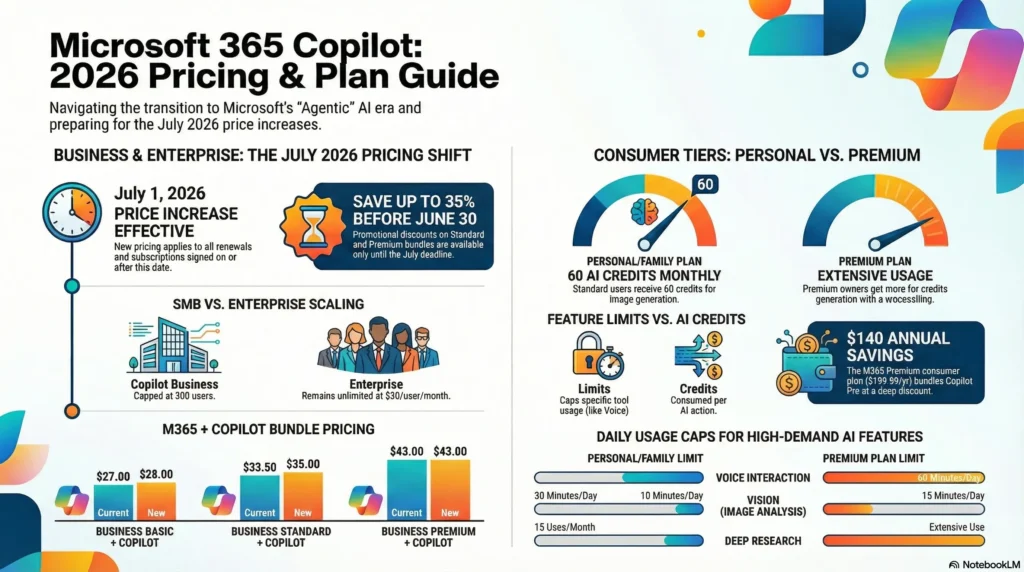
This is the plan most small businesses should be looking at, and the one most guides get wrong by quoting the enterprise price of $30. Copilot Business is a separate, more affordable SMB-specific product.
Current 2026 pricing:
- $18/user/month — promotional annual rate, available until June 30, 2026
- $21/user/month — standard annual rate from July 1, 2026 onwards
- $25.20/user/month — monthly commitment option (no annual lock-in)
Copilot Business can be added to any Microsoft 365 for business plan — Business Basic, Business Standard, or Business Premium — and supports up to 300 seats per tenant.
⚠️ Act before July 2026: Purchasing Copilot Business seats before June 30, 2026 locks in $18/user/month. After that date, the standard rate of $21/user/month applies. For a 10-person team, acting now saves $360 over the first year.
New customer convenience bundles (annual commitment, available to new Microsoft 365 customers only):
| Bundle | Promotional Price | Standard Price |
|---|---|---|
| Business Standard + Copilot Business | $22/user/month | ~$33.50/user/month |
| Business Premium + Copilot Business | $32/user/month | ~$43/user/month |
| Business Basic + Copilot Business | $27/user/month (add-on only) | Standard rates apply |
Note: Convenience bundle pricing applies to new Microsoft 365 commercial customers only. Existing customers with an eligible Business plan can access a 15% discount on the standalone Copilot Business add-on through June 30, 2026. Trusted Tech Team
What your team gets:
Copilot in Word drafts documents from a brief, rewrites in a different tone, and summarises lengthy files in seconds. In Excel, it analyses your data, generates formulas in plain English, and flags anomalies without you touching a function. Copilot in Outlook drafts replies, summarises long threads, and helps your inbox feel manageable again. In Teams, every meeting ends with an automatic summary, action items, and follow-up drafts. In our experience working with small business teams, Teams meeting summaries alone typically recover 45–60 minutes per person per week.
Billing commitment: An annual commitment is required for the $18 and $21 rates. The $25.20 monthly option gives flexibility but costs approximately 20% more over a full year. For pilots, we recommend purchasing 3–5 annual seats rather than paying the monthly premium across your whole team.
Microsoft Copilot Studio — For Businesses Building AI Agents
Copilot Studio is not a productivity tool for end users. It is a low-code platform for building custom AI agents — internal HR chatbots, customer-facing support agents, approval workflow automation connected to SharePoint and Teams.
Current pricing: $200/month for 25,000 messages
A free 30-day trial is available with a work or school email. An Azure subscription is required for full production deployment. Pay-as-you-go pricing is also available.
One important distinction your team needs to understand: Copilot Business includes Copilot Studio access for internal employee-facing agents. If you want to publish agents to external channels — a public website or customer portal — you need the standalone Copilot Studio plan.
Copilot Studio is not the right starting point for most small businesses. Unless you have a specific automation use case and an IT resource or Microsoft partner to manage implementation, start with Copilot Business and add Studio later when you have a clear requirement.
GitHub Copilot — For Development Teams
GitHub Copilot is completely separate from Microsoft 365 Copilot. It is an AI coding assistant for developers, built into GitHub and VS Code. Only relevant if your small business has in-house developers writing code regularly.
| Plan | Price | Best For |
|---|---|---|
| GitHub Copilot Free | Free (limited) | Individual developers evaluating |
| GitHub Copilot Pro | $10/user/month | Individual developers |
| GitHub Copilot Pro+ | $39/user/month | Power users, heavy AI model usage |
| GitHub Copilot Business | $19/user/month | Small dev teams, SMBs |
| GitHub Copilot Enterprise | $39/user/month | Large engineering organizations |
For most small businesses with a development team, GitHub Copilot Business at $19/user/month is the right starting point. It includes IP indemnity and audit logs, which matter for teams handling proprietary or client code.
Full Copilot Pricing Comparison Table (2026)
| Plan | Price | Best For | Key Requirement |
|---|---|---|---|
| Copilot Free | Free | General AI use | None |
| Microsoft 365 Premium | $199.99/year | Individual users | M365 Personal/Family |
| M365 Copilot Business | $18–$21/user/month | SMB teams up to 300 users | Any M365 Business plan |
| Copilot Studio | $200/month | Businesses building AI agents | Power Platform or Azure |
| GitHub Copilot Business | $19/user/month | Dev teams | GitHub account |
| M365 Copilot Enterprise | $30/user/month | 300+ user organizations | M365 E3, E5, or EA |
Prices are approximate and subject to change. Verify current pricing at microsoft.com before purchasing.
What Does Copilot Actually Cost for a Small Business?
Let us put real numbers on this for a 10-person team currently on Microsoft 365 Business Standard.
Existing customer — adding Copilot Business add-on:
- Microsoft 365 Business Standard (existing): ~$12.50/user/month × 10 = $125/month
- Copilot Business add-on (promo rate): $18/user/month × 10 = $180/month
- Total monthly: $305 | Total annual: $3,660
After June 30, 2026, at standard pricing:
- Copilot Business add-on: $21/user/month × 10 = $210/month
- Total monthly: $335 | Total annual: $4,020
New customer using convenience bundle:
- Business Standard + Copilot Business bundle: $22/user/month × 10 = $220/month total — everything included
The ROI case: If Copilot saves each employee one hour per day on emails, meeting summaries, and reports — conservatively valued at $25/hour — that is $5,500 per month in recovered productivity for 10 people. Against a $180/month Copilot cost, the return is significant. The honest caveat: that return only materializes when teams are properly trained and actually using the tool. A license without adoption is just an expense.
Is Microsoft Copilot Worth It for Small Businesses?
Yes — when these conditions are true:
- Your team uses Microsoft 365 daily across Outlook, Teams, Excel, and Word
- You have repetitive tasks consuming hours every week — reporting, emails, meeting follow-ups
- You are on any Microsoft 365 Business plan
- You are willing to invest in a structured onboarding session for your team
Not yet — when these are true:
- Your data is unorganized — Copilot needs clean, structured inputs to produce useful outputs
- Your team will not adopt new tools without a change management process
- You are on a very tight budget with a payback period under 60 days
✅ Our verdict: For most small businesses already on Microsoft 365, Copilot Business at $18/user/month is the most compelling AI investment available right now — particularly before the July 2026 price increase. The window to lock in the promotional rate is closing.
How to Choose the Right Copilot Plan
Step 1 — Check your current Microsoft 365 plan. Any Microsoft 365 Business plan (Basic, Standard, or Premium) qualifies for Copilot Business. If you are not yet on Microsoft 365, the new customer bundle pricing makes this a smart time to start.
Step 2 — Match your use case. Daily productivity across email, documents, and meetings → Copilot Business. Individual use only → Microsoft 365 Premium. Building custom AI agents → Copilot Studio. Developer coding → GitHub Copilot Business.
Step 3 — Calculate your full annual cost. Use the examples above. Include your base plan, the Copilot add-on, and at a minimum one team training session. Do not forget the July 2026 pricing change in your multi-year budget.
Step 4 — Start with a pilot. Deploy to 3–5 of your highest-volume email and meeting users first. Run it for 60 days. Measure time saved before expanding company-wide. Every business we have worked with that ran a structured pilot had a much smoother full rollout than those who bought seats for everyone on day one.
Step 5 — Scale based on results. Expand only after your pilot shows clear ROI. Do not purchase seats for users who will not actively use the tool — unused licenses are the most common source of wasted Microsoft spend we see across our clients.
Hidden Costs to Plan For
M365 plan upgrade: If you want to move from Business Basic to Standard to unlock desktop Office apps, that adds approximately $6/user/month before the Copilot add-on.
Setup and configuration: Correctly setting up data permissions, SharePoint structure, and Teams policies typically takes 5–15 hours of IT or consultant time. Poor setup produces poor Copilot outputs — and frustrated users who abandon the tool.
Training: Teams that receive structured Copilot training consistently outperform those that receive only a license. Budget for at least one onboarding session per department. This is not optional if you want ROI.
Annual commitment risk: Copilot Business requires a 12-month commitment at the annual rate. If adoption is low, you pay for unused licenses for a full year. This is exactly why starting with a pilot matters.
Conclusion
Microsoft Copilot pricing for small businesses is more manageable than most people expect — but only if you pick the right plan. For teams already on Microsoft 365, Copilot Business at $18/user/month is the clear starting point. The promotional rate runs until June 30, 2026, and the price rises to $21/user/month after that.
Check your current Microsoft 365 plan, run a 60-day pilot with your highest-usage team members, and build from there. If you want help figuring out exactly what this looks like for your business — what it will cost, what to configure, and how to get your team using it properly from day one — that is exactly what we do.
Not Sure Which Plan Is Right for Your Business?
At Empathy Technologies 365, we help small businesses implement Microsoft 365 Copilot the right way — from plan selection to deployment, training, and workflow automation. [INTERNAL LINK — Microsoft 365 implementation services page]
We help businesses:
- Identify the right Copilot plan based on your current Microsoft 365 setup and budget
- Avoid overspending on licenses your team will not use
- Configure Copilot correctly across Word, Excel, Outlook, and Teams
- Train teams to use Copilot prompts effectively from day one
- Build Power Automate workflows that extend Copilot’s automation
👉 Book Your Free Copilot Pricing Consultation Today
Frequently Asked Questions
Q1: How much does Microsoft Copilot cost for a small business in 2026?
Microsoft 365 Copilot Business costs $18/user/month under the promotional annual rate available until June 30, 2026, rising to $21/user/month from July 2026. A 10-person team pays $180/month at the promotional rate, or $210/month at standard pricing, on top of their existing Microsoft 365 subscription.
Q2: Is Microsoft Copilot included in Microsoft 365?
No. Copilot Business is a paid add-on, not included in any standard Microsoft 365 plan. Microsoft does include Copilot Chat — a free, limited AI experience — for users with eligible Microsoft 365 accounts. Full Copilot integration inside Word, Excel, Outlook, Teams, and PowerPoint requires the paid Copilot Business add-on.
Q3: Is there a free trial for Microsoft 365 Copilot Business?
No. There is no trial available for Microsoft 365 Copilot Business. You can try Microsoft 365 Copilot Chat — the free AI-powered chat experience — at no additional cost if you have a Microsoft Entra account with an eligible Microsoft 365 subscription. Microsoft: Some Microsoft partners can help you access limited evaluation options — ask your partner about current availability.
Q4: Which Microsoft 365 plans qualify for Copilot Business?
Copilot Business can be added to any Microsoft 365 for business plan — Business Basic, Business Standard, or Business Premium — and supports up to 300 seats per tenant. Microsoft Learn
Q5: Is Microsoft Copilot worth it for a small team?
Yes — for teams already using Microsoft 365 daily. When properly adopted, Copilot consistently delivers meaningful time savings on email, meeting summaries, reporting, and data analysis. The ROI is real, but it requires proper training and structured adoption. A license without training is wasted spend.
Q6: Can small businesses use Microsoft Copilot Studio
Yes, but Copilot Studio is for building custom AI agents and workflows — not standard daily productivity. Most small businesses should start with Copilot Business and add Studio only when they have a specific automation use case and the technical resources to support it.
