
More businesses are moving past simple chatbots. They want smart AI agents that can answer questions, take actions, and even work on their own.
That’s where Microsoft Copilot Studio comes in.
But before building anything, most teams ask the same questions:
- How much does Microsoft Copilot Studio cost?
- Which licensing plan should I pick?
- What features are included?
- Is pay-as-you-go cheaper?
- Is it worth the money?
This guide breaks it all down. You’ll learn about Microsoft Copilot Studio pricing, licensing, key features, and how to choose the right plan for your business in 2026.
Let’s dive in.
What Is Microsoft Copilot Studio?
Microsoft Copilot Studio is a platform for building custom AI agents.
An agent is an AI assistant built for a specific job. Think of an HR bot that answers policy questions, or a support bot that checks order status.
You don’t need to be a coder to use it. Copilot Studio is a low-code platform. You can build agents using plain language or a simple visual editor.
How is it different from Microsoft Copilot?
This trips up a lot of people. Here’s the simple version:
- Microsoft 365 Copilot is a ready-made assistant. It lives inside Word, Excel, Outlook, and Teams.
- Copilot Studio is a tool for building your own agents. You decide what they know and what they do.
One is a finished product. The other is a workshop.
What does it connect to?
Copilot Studio plugs into the Microsoft world, including:
- Microsoft Power Platform
- Microsoft Teams
- Microsoft 365
- SharePoint and other data sources
This makes it a strong fit for businesses already using Microsoft tools.
Microsoft Copilot Studio Pricing Overview (2026)
Quick answer: Copilot Studio uses a pay-as-you-go model based on “Copilot Credits.” You pay $0.01 per credit, or buy a capacity pack of 25,000 credits for $200 per month. If you already have Microsoft 365 Copilot, some agent usage is included for free.
Here’s what you need to know:
- Pricing is based on usage, not a flat per-user fee.
- You can pay as you go or pre-buy credits in packs.
- Costs depend on how your agents are built and how often they’re used.
- Prices can change. Always check Microsoft’s official pricing page before you buy.
The big shift in 2026 is the Copilot Credit. It’s the single unit that powers all billing. Different actions cost different amounts of credits, which we’ll explain below.
Microsoft Copilot Studio Licensing Options
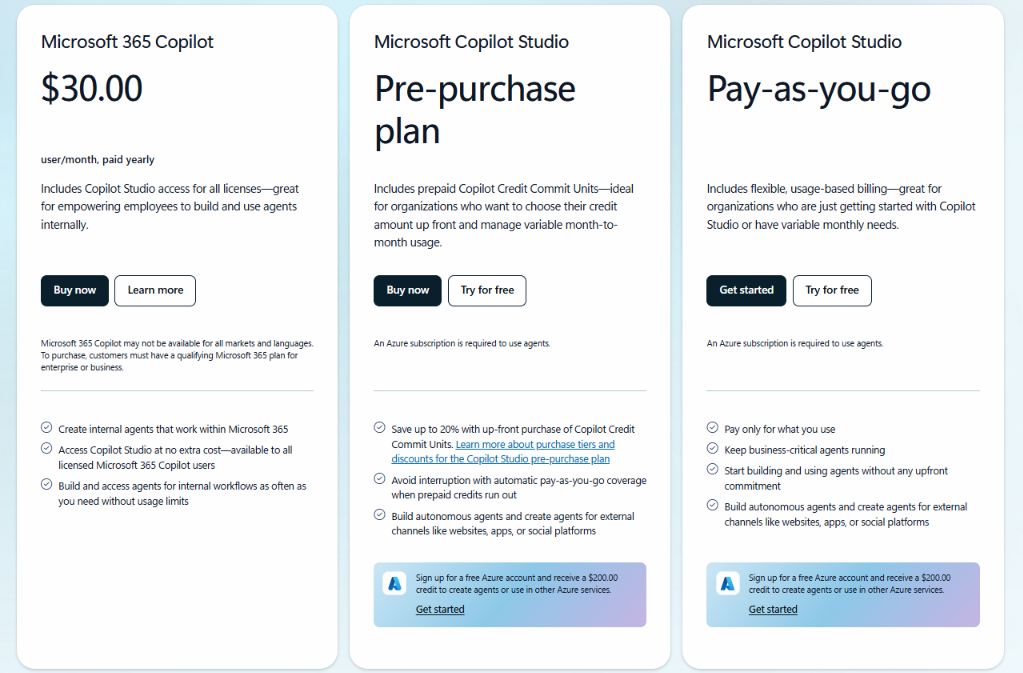
There are three main ways to pay. Let’s look at each.
Subscription Plan (Capacity Packs)
This is a prepaid option. You buy credits in advance.
- Price: $200 per month per pack
- Credits: 25,000 per pack
- Effective rate: $0.008 per credit (20% cheaper than pay-as-you-go)
One thing to watch: unused credits don’t roll over. They expire each month. So don’t over-buy.
Best for: Steady, predictable usage. Think internal AI agents, customer service bots, and medium to large businesses.
Pay-As-You-Go (PAYG)
This is the simplest option. You pay only for what you use.
- Price: $0.01 per Copilot Credit
- Commitment: None
- Billing: Monthly, after the fact
To use it, you’ll need an Azure subscription linked to your billing.
The downside? It’s the priciest rate per credit. But the flexibility is great for variable needs.
Best for: Pilots, startups, proof-of-concept projects, and seasonal workloads.
Pre-Purchase Plan
For high-volume users, there’s a third option. You buy a large pool of credits upfront for the whole year.
- Price: Starts at $2,850, scaling up for bigger tiers
- Discount: 5% to 20%, depending on how much you buy
- Expiry: Credits last the full year, not just a month
Best for: Big enterprises with high or seasonal demand. Note that these purchases are final—no refunds or swaps.
What about a free trial?
If you already have a Microsoft 365 Copilot license, you get a head start. You can build and use agents inside Microsoft apps at no extra credit cost (within fair-use limits). Anyone with Copilot Chat can also create agents for free—but using them may cost credits.
Microsoft Copilot Studio Pricing Comparison
Here’s a quick side-by-side look:
| Plan | Best For | Billing Model | Ideal Business Size |
|---|---|---|---|
| Subscription (Packs) | Predictable usage | Monthly prepaid | Medium & Enterprise |
| Pay-as-you-go | Variable workloads | Consumption | Startups & SMBs |
| Pre-Purchase Plan | High-volume usage | Annual upfront | Large Enterprise |
What’s Included in Microsoft Copilot Studio?
Copilot Studio packs in a lot. Here’s a tour of what you get.
AI Agent Builder
This is the heart of the platform. You build AI agents without writing code. They can hold real conversations, run multi-step tasks, and use generative AI to respond.
Generative AI
Your agents don’t just follow scripts. They can:
- Generate smart, natural answers
- Pull knowledge from your data
- Understand questions in plain language
Knowledge Sources
Agents are only as good as their info. Copilot Studio connects to:
- SharePoint sites
- Websites
- Files and documents
- Databases
- Microsoft Graph (your org’s emails, files, and meetings)
Power Automate Integration
Want your agent to do things, not just talk? Copilot Studio links with Microsoft Power Automate. This means your agents can run workflows, handle approvals, and send notifications.
Omnichannel Deployment
Build once, publish everywhere. You can put your agent on:
- Websites
- Microsoft Teams
- Custom apps
- Customer portals
Analytics Dashboard
You can see how your agents perform. The dashboard tracks conversations, resolution rates, and overall usage. This helps you spot what’s working and what’s not.
Security & Governance
Copilot Studio is built for business. It includes:
- Microsoft Entra ID integration (for secure sign-in)
- Role-based access
- Compliance tools
- Data governance controls
Top Microsoft Copilot Studio Features

Let’s go deeper into the features that matter most.
1. AI Agent Builder
What it does: Let’s you create custom AI agents from scratch.
Benefit: No coding skills needed, so more people can build.
Example: An HR team builds a bot that answers leave-policy questions.
2. Low-Code Development
What it does: Offers a visual editor and natural language setup.
Benefit: Faster builds and fewer technical roadblocks.
Example: A manager spins up a simple FAQ bot in an afternoon.
3. Generative AI Responses
What it does: Uses AI to write answers on the fly.
Benefit: More natural, flexible replies than scripted bots.
Example: A support agent explains a return policy in different ways for different customers.
4. Autonomous Agent Capabilities
What it does: Lets agents trigger themselves based on events, with no human needed.
Benefit: Round-the-clock automation of routine tasks.
Example: An agent processes invoices the moment they land in an inbox.
A quick heads-up: autonomous triggers always cost credits (25 per trigger), even if you have Microsoft 365 Copilot. More on this in the hidden costs section.
5. Workflow Automation
What it does: Connects to Power Automate to run tasks.
Benefit: Cuts manual work and speeds up approvals.
Example: An agent routes a purchase request to the right manager.
6. Knowledge Base Integration
What it does: Links agents to your files, sites, and databases.
Benefit: Answers are based on your real, trusted data.
Example: A bot pulls answers straight from your SharePoint policies.
7. Multi-Channel Publishing
What it does: Deploys agents across many platforms at once.
Benefit: Meet customers and staff where they already are.
Example: The same agent works in Teams and on your website.
8. AI Analytics
What it does: Tracks agent performance and usage.
Benefit: Data to improve your agents over time.
Example: You spot that 30% of chats go unresolved and fix the gap.
9. Enterprise Security
What it does: Adds secure sign-in, access controls, and compliance.
Benefit: Keeps sensitive data safe.
Example: Only HR staff can access the payroll agent.
10. Custom Topics
What it does: Let’s you define specific things your agent can discuss.
Benefit: More precise, controlled answers.
Example: You set up exact responses for common billing questions.
11. Plugin & Connector Support
What it does: Connects agents to outside apps and systems.
Benefit: Agents can pull data from tools like ServiceNow or Dynamics 365.
Example: A bot creates a support ticket in your existing system.
12. Microsoft Ecosystem Integration
What it does: Works smoothly with Teams, Microsoft 365, and Power Platform.
Benefit: Less setup hassle if you already use Microsoft.
Example: Your agent reads from Microsoft Graph to answer work questions.
Microsoft Copilot Studio Use Cases
So who actually uses this? Just about every department. Here are some real-world examples:
- Customer Support: Answer FAQs and check order status 24/7.
- HR: Handle policy questions and onboarding tasks.
- Sales: Qualify leads and pull up product info fast.
- Marketing: Respond to campaign queries and gather feedback.
- IT Help Desk: Troubleshoot common issues and create tickets.
- Finance: Process invoices and answer expense questions.
- Operations: Automate routine reports and alerts.
- Internal Knowledge Assistant: Help staff find documents and info.
- Employee Self-Service: Let staff check leave balances or request time off.
- Document Search: Surface the right file from a huge library in seconds.
Microsoft Copilot Studio vs Microsoft Copilot
Still mixing these up? This table makes it clear:
| Feature | Microsoft 365 Copilot | Copilot Studio |
|---|---|---|
| Purpose | Ready-made AI assistant | Build your own AI agents |
| AI Agent Creation | No | Yes |
| Customization | Limited | High |
| Business Automation | Basic | Advanced (via Power Automate) |
| Licensing | $30/user/month | Pay-as-you-go (credits) |
| Best For | Daily work in Office apps | Custom agents & automation |
In short: use Microsoft 365 Copilot to boost daily work. Use Copilot Studio to build something tailored to your business.
Microsoft Copilot Studio vs Power Virtual Agents
If you’ve heard of Power Virtual Agents, here’s the deal.
Copilot Studio is the next version of Power Virtual Agents. Microsoft rebranded and upgraded it in late 2023.
What changed? Copilot Studio added:
- Generative AI capabilities
- Deeper Microsoft 365 integration
- Smarter orchestration of tasks
If you used Power Virtual Agents before, Copilot Studio is its modern successor. Microsoft has folded the old tool into the new one.
How Microsoft Copilot Studio Pricing Works
Let’s keep this simple.
Everything runs on Copilot Credits. Each action your agent takes uses a set number of credits. The more complex the task, the more credits it costs.
Here’s a rough guide:
| Action | Credits |
|---|---|
| Classic answer (scripted reply) | 1 |
| Generative answer (AI-written) | 2 |
| Agent action (API call, connector) | 5 |
| Graph grounding (org data lookup) | 10 (added on) |
| Agent flows (per 100 actions) | 13 |
| Autonomous trigger (self-started) | 25 |
Credits stack up within a single chat. For example, an AI answer that also looks up org data costs 2 + 10 = 12 credits.
You buy these credits one of three ways: pay-as-you-go, monthly packs, or a yearly pre-purchase. Pick the model that matches your usage.
How Much Does Microsoft Copilot Studio Cost for Different Businesses?
Pricing is personal. Here’s a rough guide based on business size.
Startup
Recommended: Pay-as-you-go.
You’re testing the waters. PAYG means no commitment and no wasted credits. Start small and scale as you grow.
Small Business
Recommended: Pay-as-you-go, or one capacity pack.
If usage is light and uneven, stick with PAYG. If you find you’re using close to 25,000 credits a month, a single pack saves money.
Mid-Market Company
Recommended: Capacity packs.
With steady, predictable usage, packs are cheaper per credit. Buy the number of packs that matches your monthly demand.
Enterprise
Recommended: Pre-Purchase Plan.
High-volume usage unlocks bigger discounts. The yearly plan also gives more flexibility for seasonal spikes.
Hidden Costs to Consider
The credit price isn’t the whole story. Watch out for these extras:
- Autonomous triggers: Each one costs 25 credits—every time. A busy order-processing agent can run up serious costs fast.
- Integration work: Connecting agents to your systems takes time and effort.
- Training: Your team needs to learn how to build and manage agents.
- Governance: Setting up controls and approvals takes planning.
- Dataverse storage: Copilot Studio runs on Dataverse. You get 15 GB free, but heavy use means paying for more.
- Ongoing optimization: Agents need tuning to stay efficient and affordable.
A common trap is buying Microsoft 365 Copilot licenses just to dodge credit charges. For most cases, that’s far more expensive than paying credits directly. Only buy those licenses if your team also needs Copilot in Word, Excel, and Outlook.
Benefits of Microsoft Copilot Studio
Why bother with all this? Because the payoff can be big:
- Faster automation: Handle routine tasks without manual effort.
- Lower support costs: Bots field common questions, freeing up your team.
- Better productivity: Staff spend less time on repetitive work.
- Improved customer experience: Quick, 24/7 answers keep people happy.
- Scalable AI: Start small, then grow your agents as needs change.
Common Mistakes When Buying Copilot Studio
Avoid these traps that catch many first-time buyers:
- Picking the wrong plan: PAYG for high, steady volume wastes money. Packs are cheaper.
- Ignoring governance: Anyone can build agents. Without controls, costs sneak up before IT notices.
- Building without a goal: An agent with no clear purpose rarely delivers value.
- Using poor knowledge sources: Bad data in means bad answers out.
- No adoption plan: A great agent fails if no one knows how to use it.
How to Choose the Right Microsoft Copilot Studio Plan
Not sure which way to go? Ask yourself these questions:
- Team size: How many people will build and use agents?
- Number of agents: Are you running one bot or twenty?
- Expected usage: Steady or unpredictable?
- Budget: Do you need fixed costs or flexible ones?
- Integration needs: What systems must your agents connect to?
- Growth plans: Will your usage spike over the next year?
A simple rule of thumb: if you expect over 25,000 credits a month, buy at least one pack. If usage is low or uncertain, start with pay-as-you-go.
Why Businesses Choose Copilot Experts
Copilot Studio is powerful, but its pricing model can be tricky to manage. That’s where Copilot Experts comes in.
Copilot Experts helps organizations design, build, deploy, and optimize AI agents using Microsoft Copilot Studio.
Our Services
- Microsoft Copilot Studio consulting
- AI agent strategy
- Custom AI agent development
- Licensing and cost optimization
- Integration services
- Governance and security
- Employee training
- Ongoing support
Why Choose Copilot Experts?
- Microsoft AI specialists
- Real-world deployment experience
- ROI-focused implementation
- A business-first approach
- End-to-end consulting
Ready to build your first agent? Get in touch with Copilot Experts today.
Book a free consultation with our Microsoft Copilot experts
Book a MeetingFrequently Asked Questions
What is Microsoft Copilot Studio?
It’s a low-code platform for building custom AI agents. You can create bots that answer questions, take actions, and automate tasks, all without heavy coding.
How much does Microsoft Copilot Studio cost?
It runs on Copilot Credits. Pay-as-you-go is $0.01 per credit. A capacity pack is $200 per month for 25,000 credits. Always confirm current prices on Microsoft’s official page.
Is Copilot Studio free?
Not fully. Anyone with Copilot Chat can build agents for free. But running them usually costs credits, unless you have a Microsoft 365 Copilot license and use them inside Microsoft apps.
What’s the difference between Copilot Studio and Microsoft Copilot?
Microsoft 365 Copilot is a ready-made assistant for daily work. Copilot Studio is a tool for building your own custom agents.
What licensing options are available?
Three main ones: pay-as-you-go, monthly capacity packs, and an annual pre-purchase plan.
Can small businesses use Copilot Studio?
Yes. Pay-as-you-go is perfect for small teams since there’s no commitment. You only pay for what you use.
Does Copilot Studio require Azure?
For pay-as-you-go billing, yes. You’ll link an Azure subscription to handle the charges.
What is the pay-as-you-go model?
You pay $0.01 per credit, based only on actual usage. There’s no upfront commitment and no monthly minimum.
Can I build AI agents without coding?
Yes. Copilot Studio is low-code. You can build agents with plain language or a simple visual editor.
Does Copilot Studio integrate with Microsoft Teams?
Yes. You can publish your agents directly to Teams, along with websites, custom apps, and other channels.
Can Copilot Studio connect to SharePoint?
Yes. SharePoint is a common knowledge source. Your agent can pull answers straight from your SharePoint files.
Is Copilot Studio worth the cost?
For most businesses, yes. It cuts support costs, speeds up tasks, and boosts productivity. The key is matching the right plan to your actual usage.
How long does implementation take
A simple agent can be built in days. Complex, integrated agents take longer. Factor in time for testing, governance, and team training.
Build Your First AI Agent with Confidence
Microsoft Copilot Studio gives businesses a flexible way to build smart AI agents. The credit-based model means you only pay for what you use, but it also means costs can climb if you’re not careful.
The smart move is to start small. Pick pay-as-you-go for your first agent, measure its real usage, then switch to packs or a pre-purchase plan as you scale.
Need a hand getting started? Copilot Experts can help you design, deploy, and optimize agents that deliver real value, without the budget surprises.
