
Microsoft Copilot is one of the most talked-about AI tools for businesses right now. More organizations are adopting AI assistants to save time, reduce manual work, and stay competitive. Copilot sits at the centre of that shift.
But here’s the challenge. Many businesses want to adopt Copilot and are not sure where to start when it comes to pricing. The licensing structure can be confusing. There are multiple plans, different user types, and several add-on options to consider.
Copilot works directly inside the tools your team already uses every day — Microsoft 365, Teams, Excel, Word, PowerPoint, and Outlook. That deep integration is part of what makes it so powerful. But it also means you need the right licence to unlock it.
This guide breaks down everything you need to know about Microsoft Copilot pricing in 2026. You will learn about the different plans available – from Copilot Chat and Copilot Business to the new Microsoft 365 E7 Frontier Suite – what affects the cost, how pricing has changed in 2026, and how to decide whether Copilot is worth the investment for your business.
What Is Microsoft Copilot?
Microsoft Copilot is an AI-powered assistant built into Microsoft 365 applications. It uses large language models — the same type of AI behind tools like ChatGPT — combined with your organization’s own data to help employees work smarter and faster.
Copilot works directly inside the apps your teams already use:
- Microsoft Word – draft, edit, and summarise documents
- Microsoft Excel – analyze data, generate formulas, and surface insights
- Microsoft PowerPoint – create presentations from prompts or existing content
- Microsoft Outlook – draft emails, summarise threads, and manage your inbox
- Microsoft Teams – recap meetings, generate action items, and summarise chats
The difference between Copilot and a generic AI chatbot is context. Because Copilot connects to Microsoft Graph — your organization’s emails, files, chats, and meetings — its responses are grounded in your actual work data, not just the public internet.
Why Businesses Are Investing in Microsoft Copilot
Organizations are adopting Copilot for one primary reason: it saves time at scale. When every employee saves even a few hours per week, the productivity gains across a business become significant.
Real-world results support this. Globo, a global media company, reported that Copilot saved employees an average of two hours per month. The Campari Group found time savings of around two hours per week on routine tasks such as email management and meeting preparation. At Hargreaves Lansdown, one employee with dyslexia saved approximately four hours of work per day thanks to Copilot’s writing assistance.
Beyond individual time savings, businesses invest in Copilot to:
- Reduce the burden of repetitive, low-value tasks
- Speed up content creation and communication
- Extract insights from data more quickly
- Improve collaboration across hybrid and remote teams
- Empower employees to focus on higher-value work
- Build and deploy autonomous AI agents using Copilot Studio
Microsoft Copilot Pricing Overview
Microsoft does not offer a single Copilot product. It offers a family of plans designed for different user types, team sizes, and business needs. The product line has also expanded significantly in 2026, with the introduction of the Microsoft 365 E7 Frontier Suite and updates to consumer plans.
Here is a quick summary of the main Copilot plans as of mid-2026:
| Copilot Plan | Price | Best For |
| Copilot Chat | Free (with eligible M365) | All employees need basic AI chat |
| Microsoft 365 Copilot Business | $18/user/month (promo, annual) | SMBs with up to 300 users |
| Microsoft 365 Copilot (Enterprise) | $30/user/month (annual) | Enterprise organisations |
| Microsoft 365 Premium (Consumer) | $19.99/month | Individuals replacing Copilot Pro |
| Microsoft 365 Copilot Studio | From $200/pack/month | Building custom AI agents |
| Microsoft 365 E7 Frontier Suite | $99/user/month (annual) | Enterprise: AI-first all-in-one |
| Agent 365 (standalone) | $15/user/month | AI agent governance without E7 |
| ⚠️ July 2026 Price Change Alert: Microsoft is increasing base M365 plan prices from 1 July 2026. Business Basic moves from $6 to $7/user/month, Business Standard from $12.50 to $14, E3 from $36 to $39, and E5 from $57 to $60. Copilot add-on prices are not affected. Lock in current pricing before 30 June 2026 if you are on an annual or multi-year term. |
Pricing varies depending on your user type, your existing Microsoft 365 plan, the number of users you are licensing, and whether you are purchasing through an enterprise agreement. All paid business plans are sold as annual subscriptions, though monthly billing options are available at a higher rate.
Microsoft Copilot Chat: The Free Starting Point
Before committing to a paid plan, it is worth noting that
Microsoft 365 Copilot Chat is included at no additional cost for all Microsoft Entra account users with an eligible Microsoft 365 subscription.
Copilot Chat provides:
- Secure, web-grounded AI chat powered by the latest large language models
- File upload capabilities (subject to service limits)
- Basic AI capabilities within select Microsoft 365 apps
- Enterprise data protection and IT management controls
- Access to Copilot Notebooks (now rolling out to Copilot Chat users as of mid-2026)
The key limitation is that Copilot Chat uses public web data rather than your organization’s internal content. It does not connect to your emails, files, Teams conversations, or calendar. For deeper integration with workplace data, a paid Copilot licence is required.
| Important change from April 2026: Microsoft restricted Copilot Chat access in Word, Excel, PowerPoint, and OneNote for unlicensed users at organizations with 2,000 or more employees. If your organization is at this scale and relying on free Copilot Chat within Office apps, this change may already be affecting your teams. |
Microsoft 365 Copilot Pricing for Businesses
For businesses with up to 300 users, Microsoft offers
Microsoft 365 Copilot Business, which starts at $18 per user, per month (paid annually), under a promotional offer. As of July 2026, Microsoft has extended promotional pricing through September 30, 2026. The standard price is $21 per user, per month. A monthly commitment option is available at $25.20 per user, per month.
| Billing Option | Price | Notes |
| Annual (promotional) | $18/user/month | Offer extended through 30 Sept 2026 |
| Annual (standard) | $21/user/month | Permanent rate from Oct 2026 |
| Monthly commitment | $25.20/user/month | No annual lock-in required |
A separate licence for a qualifying Microsoft 365 plan is required. Eligible base plans include:
- Microsoft 365 Business Basic (moves to $7/user/month from 1 July 2026)
- Microsoft 365 Business Standard (moves to $14/user/month from 1 July 2026)
- Microsoft 365 Business Premium ($22/user/month, no change)
- Microsoft 365 Apps for Business or Enterprise
- Microsoft 365 E3 and E5
- Microsoft 365 F1 and F3
- Office 365 E3 and E5
Copilot is not a standalone product. You cannot purchase it without an underlying Microsoft 365 licence.
Bundled Pricing Options
Microsoft also offers bundled plans that combine a Microsoft 365 base plan with Copilot Business in a single package. These bundles are available to both new and existing Microsoft 365 commercial customers. Key bundles include:
- Microsoft 365 Business Standard + Copilot Business – from $23.50/user/month (now a permanent offer, not time-limited)
- Microsoft 365 Business Premium + Copilot Business – from $32/user/month (annual)
- Microsoft 365 Business Basic + Copilot Business – $27/user/month (annual)
| Buying tip: The bundled plans are often a better value than buying the base plan and the Copilot add-on separately. For example, Business Standard with Copilot is $ 23.50 as a bundle, versus $14 + $18 = $32 if purchased separately. Always compare both options before purchasing. |
Microsoft 365 Copilot (Enterprise) Pricing
The standard enterprise price for Microsoft 365 Copilot is $30 per user, per month, billed annually. This plan is designed for medium to large organizations and requires a qualifying enterprise Microsoft 365 licence.
Note: From 1 December 2025, Microsoft permanently reduced the Copilot Business (SMB) rate from $30 to $21/user/month for organizations under 300 users. The enterprise add-on for larger organizations remains at $30/user/month.
What Is Included in Microsoft 365 Copilot?
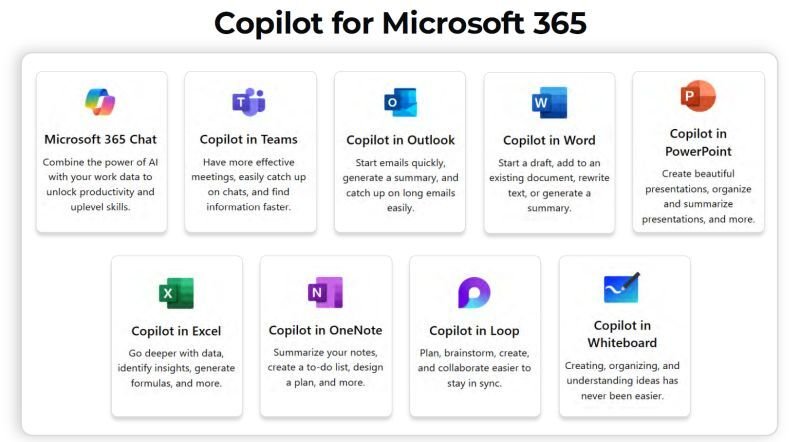
A Microsoft 365 Copilot licence gives users AI-powered capabilities across their everyday Microsoft apps. Here is what is included:
- Copilot in Word – generate drafts, rewrite content, and summarise long documents (now with agentic multi-step editing, generally available 2026)
- Copilot in Excel – analyze data with natural language, generate formulas, and highlight trends (agentic capabilities now GA)
- Copilot in PowerPoint – create presentations from documents or prompts (agentic features reached GA in April 2026)
- Copilot in Outlook – draft emails, summarise inbox threads, and prepare for meetings (agentic features in Frontier preview)
- Copilot in Teams – summarise meetings in real time, generate action items, and recap missed calls
- Copilot Chat with Work IQ – AI chat grounded in your organization’s emails, files, and meetings, now with Copilot Memory that learns your style and preferences
- Copilot Studio access – build and use internal AI agents at no extra cost
- Copilot Notebooks – a deep research and long-form reasoning tool, rolling out to licensed users mid-2026
- Copilot Analytics – track usage and measure ROI
- Enterprise Data Protection – keeps your organizational data within Microsoft 365 security boundaries
- MCP App integrations – third-party tools, including Adobe, Monday.com, and Figma, can now surface inside Copilot Chat
The enterprise plan also includes access to advanced reasoning agents (Researcher, Analyst, and Facilitator), model choice, Copilot Tuning, and role-based AI solutions for sales, service, and finance teams.
Microsoft Copilot Pro Pricing
Copilot Pro is Microsoft’s premium AI subscription for individuals. It is priced at $20 per user, per month and is designed for personal productivity rather than organizational deployment.
Copilot Pro is ideal for freelancers, creators, researchers, and individuals with a Microsoft 365 Personal or Family subscription who want more from their AI experience.
It includes:
- Copilot in Word, Excel, PowerPoint, Outlook, and OneNote (for Microsoft 365 Personal and Family subscribers)
- Priority access to the latest AI models during peak usage times
- Enhanced image generation with 100 boosts per day
- Access to advanced AI capabilities across devices
The key distinction from the business product is that Copilot Pro does not include Microsoft Teams integration or access to organizational data through Microsoft Graph. If your teams collaborate in Teams and need AI-powered meeting summaries, the Microsoft 365 Copilot business plan is the more appropriate choice.
⚠️ 2026 Update: Microsoft retired the standalone Copilot Pro plan in late 2025. Existing subscribers can continue using it until support ends on 1 August 2026, after which it will not renew. For new subscribers, Microsoft 365 Premium ($19.99/month) is the replacement — it includes all Copilot Pro features plus the full Office desktop apps and up to 6 TB of OneDrive storage in a single plan.
Copilot for Individuals: What Happened to Copilot Pro?
Copilot Pro was retired in late 2025. The standalone $20/month plan no longer exists for new subscribers. Existing subscribers can continue using it until they cancel or until support ends on 1 August 2026. After that date, Microsoft 365 Premium is the consumer replacement.
| Consumer Plan | Price | Copilot Included? | Best For |
| Microsoft 365 Basic | $1.99/month | Limited (60 credits/month) | Light use, web apps only |
| Microsoft 365 Personal | $9.99/month | Yes (60 credits/month) | Individual users, 1 person |
| Microsoft 365 Family | $12.99/month | Owner only (60 credits) | Up to 6 people sharing |
| Microsoft 365 Premium | $19.99/month | Extensive (no credit cap) | Power users replace Copilot Pro |
| Copilot Pro (legacy) | $20/month add-on | Retiring 1 Aug 2026 | Existing subscribers only |
Microsoft 365 Premium ($19.99/month) bundles everything Copilot Pro offered — AI in Word, Excel, PowerPoint, Outlook, and OneNote, priority model access, and higher usage limits — together with the full Microsoft 365 desktop apps and up to 6 TB of storage. For individuals who need Copilot in their Office apps, this is now the plan to consider.
Important for Family plan users: Copilot AI features in Microsoft 365 Family and Personal are only available to the subscription owner and cannot be shared with other plan members. Sharing users do not get Copilot access.
Microsoft Copilot Studio Pricing
Copilot Studio is Microsoft’s platform for building custom AI agents. Rather than using out-of-the-box Copilot features, organizations can design their own agents tailored to specific workflows, customer-facing use cases, or complex automation tasks.
There are three ways to access Copilot Studio:
1. Included with Microsoft 365 Copilot
All Microsoft 365 Copilot licences include Copilot Studio access for building and using internal agents within Microsoft 365. This is available to all licensed users at no additional cost and is well-suited for employee-facing automation.
2. Standalone Pre-Purchase Plan
For organizations that need to publish agents to external channels — such as websites, apps, or social platforms — a standalone Copilot Studio licence is available at $200 per 25,000 Copilot Credits per month. Credits are consumed each time an agent completes a task or generates a response. A pre-purchase plan also allows organizations to commit to a volume of credits upfront, with discounts of up to 20%.
3. Pay-As-You-Go via Azure
Copilot Studio is also available on a pay-as-you-go basis via Azure. This model requires no upfront commitment and is ideal for organizations getting started or those with variable monthly agent usage. An active Azure subscription is required.
| New in 2026: Copilot Credits replaced the older per-message billing from 1 September 2025. Certain advanced AI and agent actions draw down credits rather than a flat per-user fee. Pay-as-you-go agent usage is also available through Copilot Chat on a metered basis — useful for organizations that want to trial agents before committing to a capacity pack. |
Microsoft 365 E7: The Frontier Suite (New in 2026)
Microsoft 365 E7, announced in March 2026 and generally available from 1 May 2026, is the most significant new enterprise licensing tier Microsoft has launched since E5 in 2015. Priced at $99 per user, per month (annual commitment), it bundles four products into one SKU:
- Microsoft 365 E5 – Microsoft’s top productivity, security, and compliance suite
- Microsoft 365 Copilot – the full AI assistant across all M365 apps
- Agent 365 – a new unified control plane for managing, governing, and securing AI agents across the organization
- Microsoft Entra Suite – advanced identity and access management, plus Defender, Intune, and Purview security capabilities
E7 vs Buying Components Separately
| Option | Monthly Cost (per user) | Notes |
| Microsoft 365 E5 (from July 2026) | $60/user/month | Base productivity + security suite |
| Microsoft 365 Copilot add-on | $30/user/month | AI assistant across M365 apps |
| Agent 365 standalone | $15/user/month | AI agent governance only |
| Total (a la carte) | $105/user/month | Before Entra Suite costs |
| Microsoft 365 E7 (Frontier Suite) | $99/user/month | All of the above, one SKU |
Who should consider E7? Organizations that are already on E5 and paying for Copilot, and that have meaningful agent deployment plans that require governance, will find E7 is priced below buying these capabilities separately. The bundle also includes Agent 365, which is not available on E3.
Who should not rush to E7? If your organization’s Copilot adoption is still at an early stage, or if a large portion of your users do not need Copilot on a daily basis, committing $99 per user across your tenant is unlikely to deliver a positive ROI. The Copilot add-on model at $30/user remains the more prudent starting point for most organizations.
Agent 365 Standalone
For organizations that want AI agent governance capabilities without committing to the full E7 bundle, Agent 365 is available as a standalone add-on at $15 per user, per month. This requires an existing E5 licence and the underlying identity and security infrastructure (Purview, Entra) to be in place.
Microsoft Copilot for Sales and Copilot for Service
For organizations using Dynamics 365, Microsoft offers role-specific Copilot experiences tailored to sales and customer service teams.
Copilot for Sales integrates with CRM systems to help sales professionals:
- Generate meeting summaries with CRM-linked context
- Receive AI-recommended follow-up actions
- Surface customer insights during calls and email conversations
- Automate routine data entry into CRM platforms
Copilot for Service is designed for customer support teams and offers:
- AI-generated responses to customer enquiries
- Automated ticket summaries and routing suggestions
- Knowledge base integration for faster resolution
- Service insights and trend analysis
Pricing for both role-based Copilot solutions may vary depending on existing Dynamics 365 licensing and enterprise agreement terms. Microsoft recommends contacting a sales representative for accurate quotations based on your current environment.
Factors That Affect Microsoft Copilot Pricing
Your total Microsoft Copilot cost per user per month depends on several variables beyond the headline add-on price:
Number of Users
All Copilot plans are priced per user, per month. The more users you license, the higher your total monthly spend. However, enterprise agreements may include volume discounts — E7, for example, offers 10% off at 10 to 9,999 seats and 15% off at 100 to 9,999 seats through 31 December 2026.
Existing Microsoft 365 Plan
Copilot is an add-on, not a standalone product. Your base M365 licence determines which Copilot plans you are eligible to purchase. Remember that base M365 licence prices are increasing from 1 July 2026, so your total all-in cost will rise even if you do not change your Copilot plan.
Annual vs Monthly Billing
Annual commitments offer lower per-user pricing. Monthly billing options are available but cost significantly more. For the Copilot Business plan, this difference is $18 annually vs $25.20 per month — a 40% premium for month-to-month flexibility.
Licence Waste
The hidden cost most organizations miss: Research shows organizations typically waste 30–40% of Copilot licences within 90 days due to unassigned seats, departed employees, and low adoption. A licence assigned but never used still costs $18–$30 per month. Tracking adoption with Copilot Analytics and conducting regular licence reviews is essential to keeping your actual cost-per-productive-user under control.
Enterprise Agreements
Large organizations purchasing Copilot through Microsoft Enterprise Agreements or Cloud Solution Provider partners may be eligible for negotiated pricing and additional credits, such as Microsoft’s ECIF (Enterprise Commercial Investment Fund), to offset initial adoption costs. Note that volume discounts on the enterprise Copilot add-on expired 30 June 2026.
True All-In Cost
A common mistake is budgeting only for the Copilot add-on and forgetting the base M365 licence cost. The true all-in cost for Copilot Business is typically $34–$43/user/month, depending on the base plan. For enterprise, it is $66–$90/user/month, depending on E3 vs E5. Always budget against the combined figure, not the add-on alone.
Microsoft Copilot Pricing: A Real-World Example
To make these numbers tangible, consider a business with 100 employees on Microsoft 365 Business Standard (at the new July 2026 rate of $14/user/month):
| Item | Cost |
| Microsoft 365 Business Standard (from July 2026) | $14/user/month |
| Microsoft 365 Copilot Business (promotional annual) | $18/user/month |
| Combined per user (annual) | $32/user/month |
| Monthly total (100 users) | $3,200/month |
| Annual total | $38,400/year |
At $38,400 per year, this investment breaks even if each employee saves just over 15 minutes per working day — a very achievable outcome given the time savings documented by real Copilot customers. Forrester TEI studies have projected ROIs between 52% and 468%, depending on adoption depth and use cases.
Alternative: The Business Standard + Copilot Business bundle is available at $23.50/user/month for new customers — saving $8.50/user/month compared to buying them separately. At 100 users, that’s $850/month or $10,200 annually.
Is Microsoft Copilot Worth the Investment?
The case for Copilot strengthens considerably when you look beyond headline pricing and consider the full productivity picture.
Employees spend significant time each week on tasks Copilot can assist with or automate: drafting emails, summarising documents, preparing meeting notes, reformatting data, and searching for information. Reclaiming even a fraction of that time across a workforce translates to substantial cost savings.
Adoption data is also encouraging: Microsoft reported 15 million paid Copilot seats as of early 2026, with paid seats growing more than 160% year over year. However, with over 450 million total M365 subscribers, the gap between available and adopted remains large — meaning most organizations are still in the early stages of realizing Copilot’s value.
That said, Copilot delivers its best results when:
- Employees are properly onboarded and trained on how to write effective prompts
- Use cases are identified and prioritized before deployment
- Adoption is tracked and measured using Copilot Analytics
- Teams are encouraged to integrate Copilot into their daily routines gradually
- A pilot group of 25–50 users validates the ROI before organization-wide rollout
For organizations with a clear plan, the productivity gains are well documented. For those deploying Copilot without a strategy, adoption rates tend to be lower and ROI harder to measure.
How to Choose the Right Microsoft Copilot Plan
Selecting the right Copilot licence comes down to five questions:
- What is your organization’s size? Businesses with up to 300 users should explore Copilot Business. Larger organizations will need the enterprise plan. If you are on E5 and planning agent deployment at scale, evaluate E7.
- What Microsoft 365 plan do you currently hold? This determines which Copilot products you are eligible to purchase and what your true all-in cost will be.
- What are your primary use cases? General productivity across Teams, Outlook, and Office apps? The core Copilot Business or Enterprise licence covers this. Building custom internal agents? Studio is included. Publishing external agents? You will need a Studio capacity pack.
- Do you need external-facing agents or enterprise governance? If yes, evaluate Copilot Studio standalone or Agent 365. The E7 bundle may be cost-effective if you also need E5 capabilities.
- What is your adoption readiness? If your organization has not yet run a structured Copilot pilot, start with a limited licence deployment for 25–50 users before committing to an organization-wide rollout.
How to Get Started with Microsoft Copilot
Getting Copilot up and running in your organization involves four straightforward steps:
Step 1: Check Eligibility
Confirm that your current Microsoft 365 plan qualifies for Copilot. Eligible plans include Business Basic, Standard, Premium, E3, E5, and several others. If you are on Office 365 E3, note that you will need to upgrade to Microsoft 365 E3 before Copilot can be added (adding approximately $13/user/month to your cost).
Step 2: Purchase Licences
Add the appropriate Copilot licences through the Microsoft 365 admin centre, your Microsoft reseller, or a Cloud Solution Provider partner. If you are considering a multi-year term, locking in current pricing before 1 July 2026 can protect you against the base plan price increases taking effect on that date.
Step 3: Enable Copilot in Your Apps
Once licences are assigned, Copilot becomes available within Word, Excel, PowerPoint, Outlook, and Teams for each licensed user. Copilot Studio also becomes accessible for building internal AI agents.
Step 4: Train Your Teams
Copilot is most effective when employees understand how to write clear prompts and know which tasks to delegate to AI. Structured onboarding significantly improves adoption and ROI. Microsoft offers a daily prompt guide and role-specific training through the Microsoft 365 Copilot blog and Frontier programme resources.
Ready to Deploy Microsoft Copilot in Your Organization?
Understanding Microsoft Copilot pricing is only the first step. Getting the most from your investment requires the right implementation strategy, proper user training, and ongoing optimization.
The experts at Copilot Experts help organizations of all sizes to:
- Evaluate the right Copilot plans for their environment and budget
- Deploy and configure Microsoft 365 Copilot end-to-end
- Identify high-impact use cases across teams and departments
- Train employees to adopt AI tools effectively
- Build custom AI agents using Copilot Studio
- Measure adoption and ROI using Copilot Analytics
Microsoft Copilot for Sales and Copilot for Service
For organizations using Dynamics 365, Microsoft offers role-specific Copilot experiences tailored to sales and customer service teams.
Copilot for Sales integrates with CRM systems to help sales professionals:
- Generate meeting summaries with CRM-linked context
- Receive AI-recommended follow-up actions
- Surface customer insights during calls and email conversations
- Automate routine data entry into CRM platforms
Copilot for Service is designed for customer support teams and offers:
- AI-generated responses to customer enquiries
- Automated ticket summaries and routing suggestions
- Knowledge base integration for faster resolution
- Service insights and trend analysis
Pricing for both role-based Copilot solutions may vary depending on existing Dynamics 365 licensing and enterprise agreement terms. Microsoft recommends contacting a sales representative for accurate quotations based on your current environment.
Microsoft Copilot Studio Pricing
Copilot Studio is Microsoft’s platform for building custom AI agents. Rather than using out-of-the-box Copilot features, organizations can design their own agents tailored to specific workflows, customer-facing use cases, or complex automation tasks.
There are three ways to access Copilot Studio:
1. Included with Microsoft 365 Copilot
All Microsoft 365 Copilot licences include Copilot Studio access for building and using internal agents within Microsoft 365. This is available to all licensed users at no additional cost and is well-suited for employee-facing automation.
2. Standalone Pre-Purchase Plan
For organizations that need to publish agents to external channels — such as websites, apps, or social platforms — a standalone Copilot Studio licence is available. This is sold as a tenant-wide licence and priced at $200 per 25,000 Copilot Credits per month. Credits are consumed each time an agent completes a task or generates a response. A pre-purchase plan also allows organizations to commit to a volume of credits upfront, with discounts of up to 20%.
3. Pay-As-You-Go
Copilot Studio is also available on a pay-as-you-go basis via Azure. This model requires no upfront commitment and is ideal for organizations getting started or those with variable monthly agent usage. An active Azure subscription is required.
Factors That Affect Microsoft Copilot Pricing
Your total Microsoft Copilot cost depends on several variables:
Number of Users
All Copilot plans are priced per user, per month. The more users you license, the higher your total monthly spend. However, enterprise agreements may include volume discounts.
Existing Microsoft 365 Plan
Copilot is an add-on, not a standalone product. The base Microsoft 365 licence you hold determines which Copilot plan you can purchase. Organizations on Business Basic, Standard, or Premium can access Copilot Business. Those on E3 or E5 enterprise plans access the full Microsoft 365 Copilot product.
Annual vs Monthly Billing
Annual commitments offer lower per-user pricing. Monthly billing options are available but cost more per user. For example, the Microsoft 365 Copilot Business plan is $18–$21/user/month annually but $25.20/user/month on a monthly commitment.
Enterprise Agreements
Large organizations purchasing Copilot through Microsoft Enterprise Agreements or Cloud Solution Provider partners may be eligible for negotiated pricing and additional credits, such as Microsoft’s ECIF (Enterprise Commercial Investment Fund), to offset initial adoption costs.
Microsoft Copilot Pricing: A Real-World Example
To make these numbers tangible, consider a business with 100 employees on Microsoft 365 Business Premium.
| Item | Cost |
|---|---|
| Microsoft 365 Business Premium | ~$22/user/month |
| Microsoft 365 Copilot Business (add-on, promo rate) | $18/user/month |
| Combined per user (annual, promotional) | $32/user/month |
| Monthly total (100 users) | $3,200/month |
| Annual total | $38,400/year |
At $38,400 per year, this investment breaks even if each employee saves just over 15 minutes per working day — a very achievable outcome given the time savings documented by real Copilot customers. Forrester TEI studies have projected ROIs between 52% and 468%, depending on adoption depth and use cases.
Is Microsoft Copilot Worth the Investment?
The case for Copilot strengthens considerably when you look beyond headline pricing and consider the full productivity picture.
Employees spend significant time each week on tasks Copilot can assist with or automate: drafting emails, summarising documents, preparing meeting notes, reformatting data, and searching for information. Reclaiming even a fraction of that time across a workforce translates to substantial cost savings.
That said, Copilot delivers its best results when:
- Employees are properly onboarded and trained on how to write effective prompts
- Use cases are identified and prioritized before deployment
- Adoption is tracked and measured using Copilot Analytics
- Teams are encouraged to integrate Copilot into their daily routines gradually
For organizations with a clear plan, the productivity gains are well documented. For those deploying Copilot without a strategy, adoption rates tend to be lower and ROI harder to measure.
How to Choose the Right Copilot Plan
Selecting the right Copilot licence comes down to four questions:
- What is your organization’s size? Businesses with up to 300 users should explore Copilot Business. Larger organizations will need the enterprise plan.
- What Microsoft 365 plan do you currently hold? This determines which Copilot products you are eligible to purchase.
- What are your primary use cases? General productivity across Teams, Outlook, and Office apps? The core Copilot licence covers this. Building custom agents? You will also need Copilot Studio. CRM-integrated workflows? Explore Copilot for Sales or Service.
- Do you need external-facing agents? If yes, a standalone Copilot Studio licence is required in addition to or instead of the included Studio access.
How to Get Started With Microsoft Copilot
Getting Copilot up and running in your organization involves four straightforward steps:
Step 1: Check eligibility
Confirm that your current Microsoft 365 plan qualifies for Copilot. Eligible plans include Business Basic, Standard, Premium, E3, E5, and several others.
Step 2: Purchase licences
Add the appropriate Copilot licences through the Microsoft 365 admin centre, your Microsoft reseller, or a Cloud Solution Provider partner.
Step 3: Enable Copilot in your apps
Once licences are assigned, Copilot becomes available within Word, Excel, PowerPoint, Outlook, and Teams for each licensed user.
Step 4: Train your teams
Copilot is most effective when employees understand how to write clear prompts and know which tasks to delegate to AI. Structured onboarding significantly improves adoption and ROI.
Ready to Deploy Microsoft Copilot in Your Organization?
Understanding Microsoft Copilot pricing is only the first step. Getting the most from your investment requires the right implementation strategy, proper user training, and ongoing optimization.
The experts at Copilot Experts help organizations of all sizes to:
- Evaluate the right Copilot plans for their environment
- Deploy and configure Microsoft 365 Copilot end-to-end
- Identify high-impact use cases across teams and departments
- Train employees to adopt AI tools effectively
- Build custom AI agents using Copilot Studio
Book a free Copilot consultation today and discover how your organization can start realizing the productivity benefits of Microsoft Copilot — without the guesswork.
Frequently Asked Questions
How much does Microsoft Copilot cost per user per month in 2026?
Pricing depends on the plan and organization size. Microsoft 365 Copilot Chat is included at no extra cost with eligible Microsoft 365 subscriptions. The paid business plan (Copilot Business) for SMBs under 300 users starts from $18/user/month (promotional annual rate through September 2026), with standard pricing at $21/user/month. The enterprise add-on for larger organizations is $30/user/month. For individuals, Microsoft 365 Premium is $19.99/month and replaces the retired Copilot Pro plan.
What is the Microsoft Copilot business pricing for small businesses?
Small businesses with up to 300 users can access Microsoft 365 Copilot Business starting from $18/user/month (annual, promotional pricing through September 2026). Bundled with Microsoft 365 Business Standard, the all-in price is $23.50/user/month. A separate qualifying M365 base plan is required.
What happened to Copilot Pro pricing?
Microsoft retired the standalone Copilot Pro plan ($20/month) in late 2025. Existing subscribers can continue using it until 1 August 2026. For new subscribers, Microsoft 365 Premium ($19.99/month) is the consumer replacement and includes the same AI capabilities in Office apps plus up to 6 TB of storage.
What is Microsoft 365 E7, and how much does it cost?
Microsoft 365 E7, launched on 1 May 2026, is Microsoft’s new enterprise “Frontier Suite” priced at $99 per user per month (annual commitment). It bundles Microsoft 365 E5, Microsoft 365 Copilot, Agent 365 (AI agent governance), and the Microsoft Entra Suite into a single SKU. It represents a better value than buying these components separately, which would cost approximately $105/user/month. E7 is designed for enterprise organizations ready to deploy AI at scale with full governance controls.
Is Microsoft Copilot included in Microsoft 365?
Microsoft 365 Copilot Chat is included at no extra cost for users with an eligible Microsoft 365 subscription. However, the full Microsoft 365 Copilot experience — with deep integration into Word, Excel, PowerPoint, Outlook, and Teams, and access to your organization’s data via Microsoft Graph — requires a separate paid add-on licence.
Which Microsoft 365 plans support Copilot?
Qualifying plans include Microsoft 365 Business Basic, Business Standard, Business Premium, Apps for Business and Enterprise, E3, E5, F1, F3, and Office 365 E3 and E5. Note that organizations on Office 365 E3 must first upgrade to Microsoft 365 E3 before Copilot can be added.
How much does Microsoft Copilot cost for enterprise?
For enterprise organizations, Microsoft 365 Copilot is $30 per user, per month, added to a qualifying M365 enterprise base plan. The true all-in cost is $66 to $90/user/month, depending on whether you are on E3 ($36, rising to $39 from July 2026) or E5 ($57, rising to $60). The E7 Frontier Suite at $99/user/month includes Copilot plus E5 and agent governance in one bundle.
Which Microsoft Copilot plan offers the best value for small businesses?
For most small businesses under 300 users, the Microsoft 365 Business Standard + Copilot Business bundle at $23.50/user/month (annual) offers the best combination of value and functionality. It includes the full Office desktop apps, Teams, Exchange, SharePoint, OneDrive, and Copilot across all M365 apps. If your team only needs web-based apps, the Business Basic + Copilot combination at $27/user/month is a lower-cost option.
What are the Microsoft Copilot free tier limits in 2026?
The free Copilot Chat tier (available with eligible M365 subscriptions) is web-based and does not access your organization’s internal data. Consumer Microsoft 365 Personal and Family plan owners receive 60 Copilot AI credits per month for use in Office apps. Microsoft 365 Premium removes these credit limits. For organizations with 2,000+ users, access to Copilot Chat features in Word, Excel, PowerPoint, and OneNote has been restricted for unlicensed users since April 2026.
Is Microsoft Copilot worth the investment?
For most organizations, yes — particularly when adoption is managed well. Real-world customers have reported time savings of two or more hours per week per employee. Forrester research projects ROIs ranging from 52% to 468%, depending on how deeply Copilot is embedded into daily workflows. The key is pairing the licence with a structured deployment and training strategy. Starting with a pilot group of 25–50 users before rolling out organization-wide is the approach most likely to deliver measurable ROI.
What is the difference between Copilot Chat and Microsoft 365 Copilot?
Copilot Chat is the free tier, offering web-grounded AI chat and limited capabilities within select apps. It does not connect to your organization’s internal data. Microsoft 365 Copilot (the paid add-on) provides full integration with your emails, files, Teams conversations, and calendar via Microsoft Graph, along with advanced features across all Microsoft 365 apps, including agentic multi-step task execution introduced in 2026.
What is Microsoft Copilot Studio pricing?
Copilot Studio is included with all Microsoft 365 Copilot licences for internal agent use. For external agent deployment, a standalone licence is priced at $200 per 25,000 Copilot Credits per month. Pay-as-you-go via Azure is also available. As of September 2025, Copilot Credits replaced the older per-message billing model. Pre-purchase capacity packs offer up to 20% savings for predictable usage.
How does the Microsoft 365 Copilot family plan work for 4 users?
There is no specific Copilot “family plan” for business use. For business teams of any size, the appropriate route is Microsoft 365 Copilot Business (for up to 300 users) or the enterprise plan. The Microsoft 365 Family plan ($12.99/month) is a consumer subscription for up to six people in a household, but Copilot AI features in that plan are only available to the subscription owner, not the other plan members. For a team of four business users, the Copilot Business add-on at $18/user/month annually is the correct path.