
AI is no longer something businesses plan for in the future. It is happening right now, reshaping how teams work, communicate, and make decisions. At the centre of this shift in the Microsoft ecosystem is Microsoft Copilot — an AI assistant built directly into the tools your employees already use every day.
Microsoft’s vision is straightforward: embed AI into every part of the Microsoft 365 experience so that people can work faster, smarter, and with less friction. Whether you are drafting a report in Word, analysing a spreadsheet in Excel, preparing a presentation in PowerPoint, managing your inbox in Outlook, or running a meeting in Teams, Copilot is there to help — not as a separate tool you have to open, but as a built-in assistant that works alongside you.
This is why businesses are adopting Copilot quickly. According to Alumio, adoption rates exceeded 65% among Fortune 500 companies by March 2025. The appeal is clear: there is no need to learn a new platform, no need to copy-paste data into a chatbot, and no need to build workflows from scratch.
In this guide, you will learn everything you need to know about Microsoft Copilot in 2026. We cover what it is, how it works, its key features, pricing, real-world use cases, limitations, and how to get started.
What Is Microsoft Copilot?
Microsoft Copilot is an AI-powered assistant integrated directly into Microsoft 365 applications. It uses generative AI and large language models (LLMs) to help users complete tasks faster and more effectively.
Think of it as an intelligent colleague who never tires. You can ask it to write emails, summarise documents, analyse data, generate slides, recap meetings, or automate repetitive tasks — all using plain English.
The key difference between Copilot and standalone AI chatbots like ChatGPT is context. Copilot connects to your organisation’s data through Microsoft Graph, meaning it understands your files, emails, meetings, and chats. It does not just respond to prompts; it responds to prompts with knowledge of your actual work.
Core capabilities include:
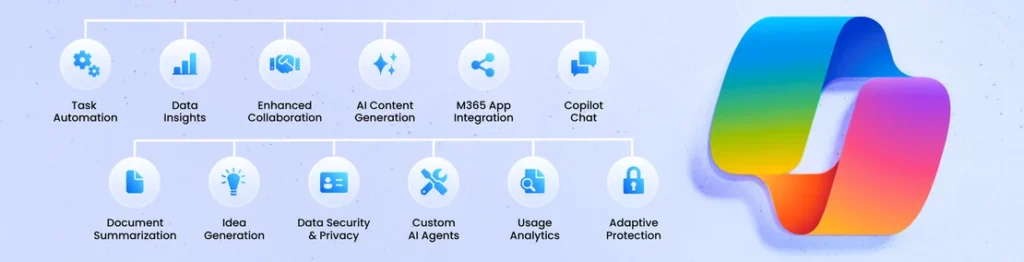
- Automation – Handles routine tasks like drafting emails and summarising reports
- Content generation – Writes documents, presentations, and meeting notes
- Summarisation – Condenses long threads, reports, and transcripts into key points
- Data analysis – Identifies trends, builds formulas, and visualises data in Excel
How Microsoft Copilot Works
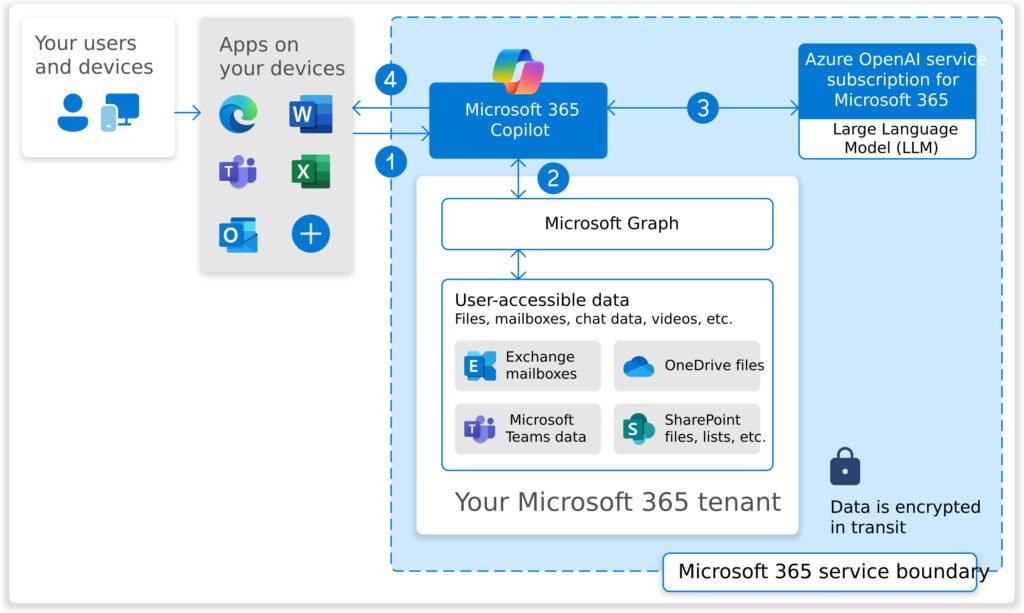
Copilot is not just a chatbot layered on top of Microsoft 365. It is a sophisticated system that combines several technologies to deliver accurate, context-aware results.
Core Technologies Behind Copilot
At its foundation, Copilot uses the Microsoft Azure OpenAI Service, which provides access to powerful large language models (LLMs). LLMs are AI algorithms trained on vast amounts of text data. They can understand, summarise, predict, and generate language in a way that feels natural and human.
Copilot also uses semantic indexing, which helps it retrieve information more accurately by understanding the meaning behind words, not just matching keywords.
Microsoft Graph Integration
One of Copilot’s most important features is its connection to Microsoft Graph. Microsoft Graph is the layer that connects all your Microsoft 365 data — emails, documents, calendars, chats, and meetings.
When you ask Copilot to draft a follow-up email based on your last meeting, it can pull the relevant information directly from Teams. When you ask it to create a report based on last month’s sales, it can reference your Excel files. This makes Copilot a genuinely useful assistant, not just a generic AI tool.
Crucially, Copilot only surfaces information that the user already has permission to access. It respects your existing security settings.
Security and Compliance
Copilot is built with enterprise security in mind. Key protections include:
- Data protection – All prompts and outputs remain within your organisation’s Microsoft 365 tenant
- Tenant data isolation – Your data is never used to train public AI models
- Compliance – Copilot works within your existing compliance frameworks, including GDPR and HIPAA
- Microsoft Purview integration – Scans for sensitive information, prevents oversharing, and flags non-compliant usage in real time
Key Features of Microsoft Copilot
Here is an overview of Copilot’s most impactful capabilities.
Content Generation
Copilot can generate a wide range of written content on demand:
- Draft professional emails in seconds
- Write reports and summaries from scratch or based on existing documents
- Produce meeting summaries after a call ends
- Create job descriptions, proposals, and policy documents
Users simply describe what they need in plain English and Copilot handles the rest.
Data Analysis
Copilot makes data analysis accessible to everyone, not just analysts. It can:
- Identify trends and patterns in spreadsheets
- Suggest and create formulas automatically
- Build charts and visualisations from raw data
- Surface key insights without the need for deep technical skills
Meeting Summaries
After every meeting, Copilot can produce a clear, concise summary — including who said what, what was agreed, and what the next steps are. This is particularly useful for employees who missed a meeting or need to catch up quickly.
Task Automation
Copilot reduces the time spent on repetitive work by automating routine tasks such as:
- Email drafting and response suggestions
- Report generation
- Data entry and formatting
- Document classification
Smart Recommendations
As you work, Copilot provides contextual suggestions. It might recommend a clearer way to phrase a sentence in Word, flag a scheduling conflict in Outlook, or suggest a relevant formula in Excel — all in real time, without interrupting your flow.
Microsoft Copilot in Different Microsoft Apps
Copilot in Microsoft Word
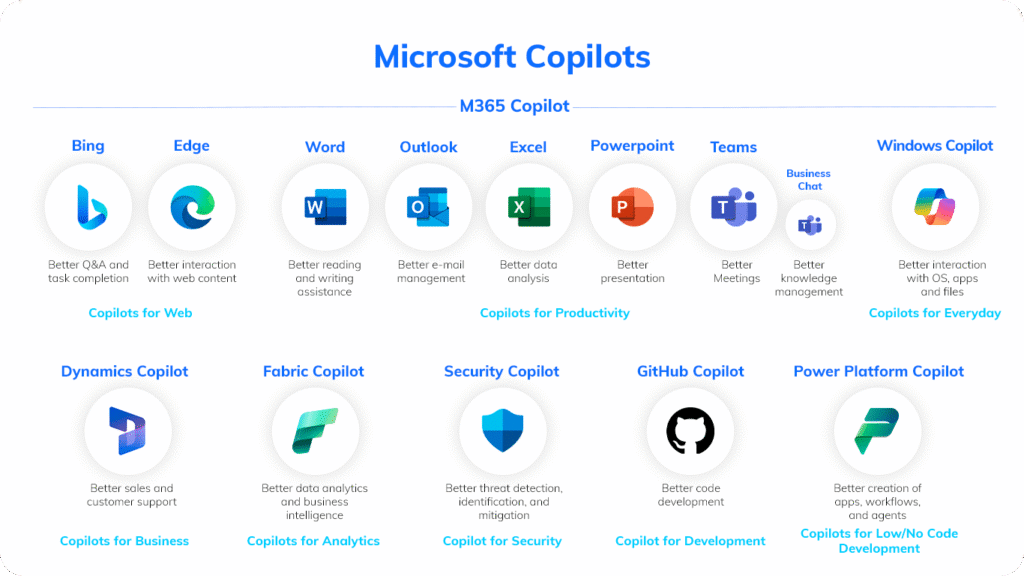
Copilot in Word acts as an intelligent writing partner. It can:
- Draft entire documents from a short prompt or outline
- Rewrite existing text to improve clarity or tone
- Summarise long reports into key takeaways
- Suggest different tones, from formal to conversational
For example, an HR manager can ask Copilot to generate a job description based on a few bullet points, then refine it in seconds.
Copilot in Microsoft Excel
Copilot turns Excel into a more powerful analytical tool. It can:
- Analyse datasets and identify correlations
- Generate and explain complex formulas
- Build charts and visualisations from raw data
- Run what-if scenarios to forecast outcomes
Instead of spending hours building a budget model manually, a finance analyst can ask Copilot to create one based on existing data.
Copilot in Microsoft PowerPoint
Copilot helps you build professional presentations quickly. It can:
- Create a full slide deck from a Word document or prompt
- Generate speaker notes automatically
- Redesign layouts to improve visual consistency
- Condense lengthy presentations into a shorter, focused version
Copilot in Microsoft Outlook
Email management is one of Copilot’s strongest use cases. It can:
- Draft replies to emails based on previous conversations
- Summarise long email threads so you can catch up at a glance
- Flag important messages and prioritise your inbox
- Provide coaching suggestions to improve the clarity and tone of your writing
Copilot in Microsoft Teams
Copilot makes meetings more productive. During and after calls, it can:
- Generate real-time meeting summaries from live transcripts
- Extract action items and assign them to the right people
- Answer questions about what was discussed
- Summarise up to 30 days of chat history in a given thread
Microsoft Copilot Pricing
Microsoft 365 Copilot is available as an add-on licence for qualifying Microsoft 365 subscriptions, such as Microsoft 365 E3 or E5. Pricing is per user per month and is charged on top of your existing Microsoft 365 licence.
Pricing varies by region and plan, so it is worth checking the Microsoft website or speaking to a partner like Copilot Experts for the latest figures in your area.
Copilot Pro Pricing
Copilot Pro is the individual subscription designed for personal use. It gives home users and freelancers access to Copilot within Word, Excel, PowerPoint, and Outlook, as well as priority access to the latest AI models.
What Is Included in Copilot Plans
| Feature | Microsoft 365 Copilot | Copilot Pro |
|---|---|---|
| Word, Excel, PowerPoint, Outlook | ✅ | ✅ |
| Microsoft Teams integration | ✅ | ❌ |
| Microsoft Graph access | ✅ | Limited |
| Enterprise security & compliance | ✅ | ❌ |
| Copilot Studio access | ✅ | ❌ |
| Best for | Businesses & enterprises | Individuals |
Benefits of Microsoft Copilot for Businesses
Increased Productivity
Employees complete tasks faster when Copilot handles the time-consuming parts. Drafting a proposal that used to take two hours can be done in minutes. Summarising a week’s worth of emails takes seconds. These savings add up across an entire organisation.
Better Decision Making
Copilot surfaces relevant data and insights at the point of decision. A sales manager preparing for a client call can ask Copilot to pull together key account information from emails, meeting notes, and CRM records. The result is better-prepared conversations and more confident decisions.
Reduced Manual Work
Repetitive administrative tasks — formatting reports, updating spreadsheets, replying to routine emails — consume significant time. Copilot automates much of this work, freeing employees to focus on higher-value activities.
Improved Collaboration
Copilot connects Teams, Outlook, Word, and other apps in a way that makes collaboration feel more natural. Teams can reference shared files in chat, create tasks from meeting notes, and stay aligned without switching between multiple platforms.
Real-World Use Cases of Microsoft Copilot
Marketing Teams
Marketing teams use Copilot to move faster on content and campaigns:
- Generate first drafts of blog posts, social media copy, and email campaigns
- Produce campaign performance reports from existing data
- Summarise customer feedback and market research into actionable insights
Sales Teams
Sales professionals use Copilot to spend more time selling and less time on admin:
- Draft personalised follow-up emails after client calls
- Generate sales reports and pipeline summaries
- Pull CRM data to prepare for prospect meetings
Finance Teams
Finance teams use Copilot for faster, more accurate analysis:
- Analyse financial data in Excel and identify trends
- Build budget forecasts using historical data
- Generate financial reports and presentations from raw spreadsheets
HR Departments
HR professionals use Copilot to reduce paperwork and improve processes:
- Draft job descriptions, policy documents, and onboarding materials
- Summarise employee feedback and survey results
- Generate recruitment documentation quickly
Project Managers
Project managers use Copilot to keep projects on track:
- Produce meeting summaries and action item lists after every call
- Generate status reports from project notes and updates
- Plan project timelines and task lists using plain-English prompts
Microsoft Copilot Limitations
Copilot is a powerful tool, but it is important to be realistic about its limitations:
- AI accuracy – Copilot can generate incorrect or incomplete information. Outputs should always be reviewed before sharing externally.
- Data quality dependency – Copilot is only as good as the data it has access to. Poor data organisation can lead to less useful results.
- Licensing costs – The add-on licence represents an additional cost per user, which can be significant for larger organisations.
- Learning curve – Getting the most out of Copilot requires learning how to write effective prompts. Employees may need training to use it well.
- Permissions-based access – Copilot can only work with data users are already permitted to access, which is a security benefit but can also limit its usefulness in some scenarios.
Is Microsoft Copilot Worth It?
For most organisations already using Microsoft 365, the answer is yes — with the right approach.
The ROI case is strong. Hours saved on drafting, summarising, and analysing translate directly into productivity gains. Microsoft’s own research has shown that Copilot users report significant time savings on a weekly basis across email, meetings, and document creation.
That said, Copilot works best when businesses invest time in onboarding and training. Simply enabling the licence and expecting immediate results is unlikely to deliver the full value.
Copilot makes most sense for businesses that:
- Already use Microsoft 365 across their organisation
- Have employees who spend significant time on email, meetings, and documents
- Are ready to invest in employee training and change management
- Have data governance policies in place
Smaller teams with limited Microsoft 365 usage may see a slower return on investment, but for knowledge-worker-heavy organisations, Copilot quickly pays for itself.
How to Get Started With Microsoft Copilot
Step 1: Check Microsoft 365 Eligibility
Copilot requires a qualifying Microsoft 365 subscription. Check that your current plan is eligible — common qualifying plans include Microsoft 365 E3, E5, Business Standard, and Business Premium.
Step 2: Purchase a Copilot Licence
Once eligibility is confirmed, purchase the Microsoft 365 Copilot add-on through your Microsoft admin portal or through a Microsoft partner. Pricing is per user per month.
Step 3: Enable Copilot in Apps
Your IT administrator will enable Copilot through the Microsoft 365 Admin Centre. Once enabled, Copilot will appear within Word, Excel, PowerPoint, Outlook, and Teams for licensed users.
Step 4: Train Employees to Use AI Tools
This is the most important step. Provide employees with training on how to write effective prompts, how Copilot accesses their data, and how to review and validate AI-generated outputs. The Microsoft 365 Copilot Skilling Centre offers free resources to help teams get started.
The Future of Microsoft Copilot
Microsoft is investing heavily in expanding Copilot’s capabilities. Key developments to watch in 2026 and beyond include:
- AI agents – Copilot Agents are moving beyond answering prompts to taking proactive actions on behalf of users. Rather than drafting an email, an agent can send it, schedule a follow-up meeting, and update a CRM record automatically.
- Deeper automation workflows – Integration with Power Automate allows Copilot to trigger complex, multi-step workflows without code.
- Microsoft Copilot Studio – This low-code platform lets organisations build custom Copilot experiences connected to their own data sources and systems. A retailer might build a Copilot agent that monitors inventory levels. A law firm might build one that references internal knowledge bases securely.
- Broader integrations – Microsoft continues to expand Copilot into Dynamics 365, Power BI, Microsoft Fabric, and third-party tools through Microsoft Graph Connectors.
The direction is clear: Copilot is becoming the standard layer of intelligence across the entire Microsoft ecosystem.
Microsoft Copilot Is Transforming How Work Gets Done
Microsoft Copilot offers organisations a practical, secure, and scalable way to bring AI into their everyday workflows. By embedding intelligence directly into Word, Excel, PowerPoint, Outlook, and Teams, it helps employees work faster, make better decisions, and reduce time spent on low-value tasks.
The businesses that will benefit most are those that treat Copilot as a strategic investment — rolling it out thoughtfully, training employees properly, and building governance frameworks to ensure responsible use.
AI adoption does not have to be complicated. With the right support, your organisation can be up and running with Copilot in weeks, not months.
Need help implementing Microsoft Copilot in your organisation?
Our experts at Copilot Experts can help you:
- Implement Copilot across your Microsoft 365 environment
- Train employees to use AI tools effectively
- Build custom AI workflows with Copilot Studio
- Automate business processes end to end
👉 Book a free Microsoft Copilot consultation today.
Frequently Asked Questions
What is Microsoft Copilot used for?
Microsoft Copilot is used to improve productivity across Microsoft 365 apps. It helps users draft emails, summarise documents, analyse data, generate presentations, recap meetings, and automate repetitive tasks — all using plain English prompts.
Is Microsoft Copilot free?
Copilot is not free for business use. It is available as a paid add-on to qualifying Microsoft 365 subscriptions, priced per user per month. A limited free version called Copilot Chat is available without an additional licence, but it has fewer features and limited access to organisational data.
Which Microsoft apps support Copilot?
Copilot is available in Word, Excel, PowerPoint, Outlook, Teams, OneNote, Loop, Forms, and Whiteboard. It is also available in Windows, Edge, and through the Microsoft 365 Copilot Chat app.
Is Microsoft Copilot safe for businesses?
Yes. Copilot is built on Microsoft’s enterprise-grade security framework. It respects existing Microsoft 365 permissions, encrypts data, and keeps all prompts and outputs within your organisation’s tenant. It does not use your data to train public AI models. Microsoft Purview adds additional governance capabilities for regulated industries.
How does Microsoft Copilot improve productivity?
Copilot saves time by automating routine tasks, generating content quickly, summarising information on demand, and surfacing relevant insights at the point of need. Employees can focus on higher-value, strategic work instead of spending hours on drafting, formatting, and manual data analysis.