
Businesses are under more pressure than ever to automate workflows, reduce manual effort, and deliver faster results. AI-powered agents are becoming central to how organisations operate — handling customer queries, processing requests, and connecting systems without human intervention.
The challenge? Building AI traditionally requires developers, data scientists, and months of development time. Most businesses simply do not have those resources.
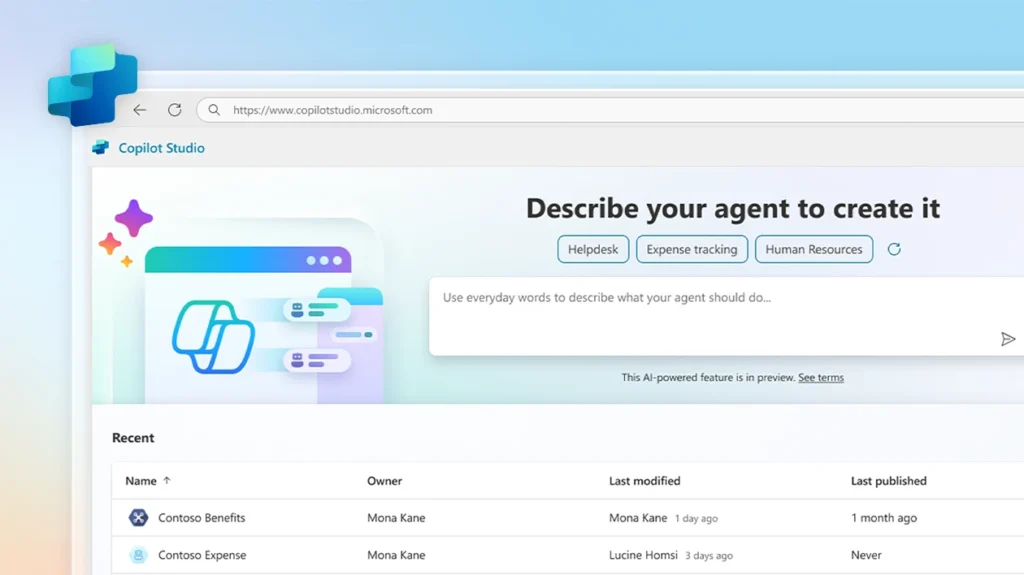
Microsoft Copilot Studio changes that. It gives organisations a low-code platform to build, deploy, and manage AI-powered agents — without writing a single line of code.
In this guide, you will learn exactly what Microsoft Copilot Studio is, how it works, what it costs, and how your organisation can start using it to automate workflows and improve productivity.
Here is what we will cover:
- What Microsoft Copilot Studio is
- Why Microsoft built it
- Key features and capabilities
- How AI agents work inside the platform
- Real-world use cases
- Pricing and licensing
- Limitations to be aware of
- How to get started
What Is Microsoft Copilot Studio?
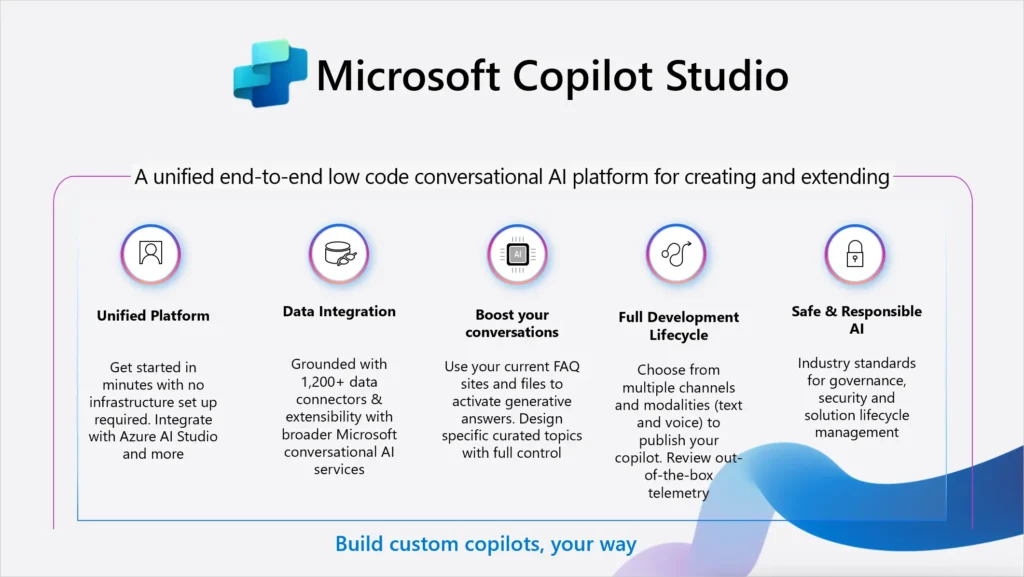
Microsoft Copilot Studio is a low-code platform that allows organisations to build AI-powered agents and automate business workflows.
An AI agent is a software programme that can hold conversations, answer questions, take actions, and complete tasks — automatically, on behalf of users.
With Copilot Studio, you can build these agents using visual tools rather than complex programming. You design the agent’s behaviour, connect it to your business data, and deploy it across your organisation.
Copilot Studio integrates deeply with the Microsoft ecosystem, including:
- Microsoft 365 — for internal productivity and employee-facing agents
- Microsoft Teams — to deploy agents directly inside your communication platform
- Microsoft Power Automate — to trigger automated workflows from agent conversations
- Microsoft Power Platform — for broader app and automation development
- Microsoft Dynamics 365 — to support sales, service, and operations teams
- Microsoft SharePoint and Dataverse — as data sources for agents
According to Microsoft’s official Licensing Guide (February 2026), Copilot Studio is described as “a comprehensive conversational AI platform that empowers users to build, customise and deploy agents using natural language or a graphical interface.”
From Power Virtual Agents to Copilot Studio
Copilot Studio evolved from Power Virtual Agents — Microsoft’s earlier chatbot-building platform. Microsoft introduced Copilot Studio publicly at Microsoft Ignite in November 2023, positioning it as a central tool in its AI strategy.
The platform has expanded significantly since then. It now supports autonomous agents, generative AI orchestration, multi-agent systems, and complex workflow automation — capabilities far beyond what early chatbot tools offered.
Why Microsoft Created Copilot Studio
Most businesses want to automate repetitive work and build AI assistants. The barriers have always been the same:
- You need developers
- You need data scientists
- Building AI systems takes months
- Maintaining them is expensive
Microsoft built Copilot Studio to remove those barriers.
The platform uses a visual, low-code interface. Business users — not just developers — can design agents, define how they respond, connect them to data, and deploy them. This opens AI development to a much wider audience inside organisations.
At the same time, the platform is powerful enough for technical teams. Developers can extend agents with custom connectors, REST APIs, Power Automate flows, and Model Context Protocol (MCP) integrations.
The result is a platform that works for both business users and IT teams — bridging the gap between what businesses need and what they can realistically build.
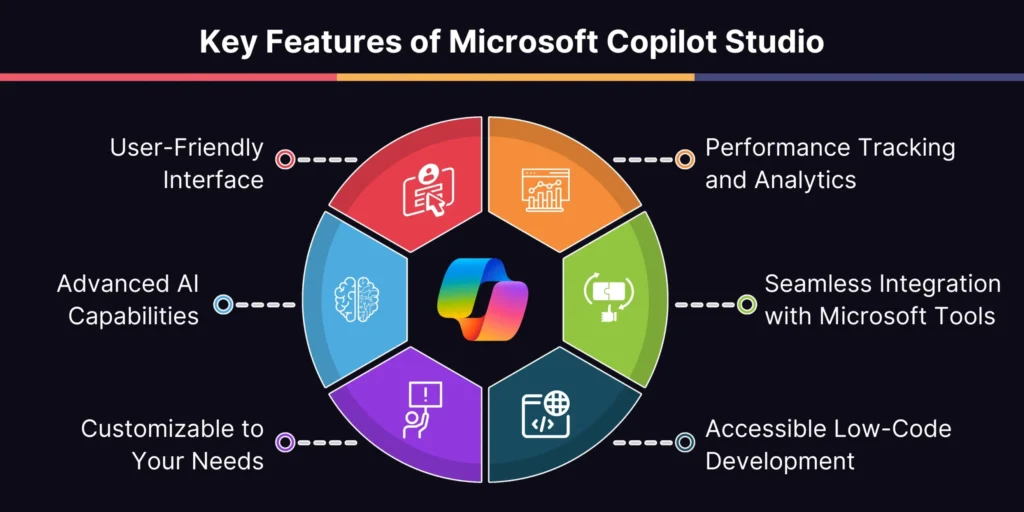
Key Features of Microsoft Copilot Studio
Build AI Agents Without Coding
Copilot Studio provides a visual drag-and-drop interface for building AI agents. You do not need to write code to design conversation flows, define agent behaviour, or connect data sources.
The platform also supports natural language authoring. You can describe what you want the agent to do in plain English, and Copilot Studio interprets your intent and builds the conversation structure for you.
Key capabilities include:
- Visual conversation designer
- Pre-built agent templates
- Natural language topic creation
- AI-driven suggestions for triggers and actions
- Built-in testing panel to review agent behaviour before deployment
Custom AI Agent Creation
Every organisation has different needs. Copilot Studio lets you build agents tailored to specific departments, roles, or processes.
You can create agents for:
- Customer support — handling common queries, reducing ticket volumes
- HR — answering employee questions about policies, benefits, and processes
- IT helpdesk — resolving common technical issues automatically
- Sales — qualifying leads, surfacing product information, supporting reps
- Internal knowledge — helping employees find documents and information quickly
Each agent can be given a specific purpose, personality, and set of capabilities to match your business needs.
Generative AI Orchestration
One of the most powerful features in Copilot Studio is generative AI orchestration.
By default, newly created agents use generative orchestration. This means the agent uses AI to intelligently select the best topic, tool, knowledge source, or connected agent to respond to a user — without needing rigid, rule-based conversation paths.
Here is how it compares to classic, rule-based orchestration:
| Feature | Generative Orchestration | Classic Orchestration |
|---|---|---|
| Topic selection | AI selects based on description | Matches trigger phrases |
| Tool usage | Agent decides automatically | Must be called explicitly |
| Knowledge search | Proactively searches | Used as fallback only |
| Multi-intent queries | Handles multiple at once | Tries to match single topic |
| Follow-up questions | Generated automatically by AI | Must be authored manually |
This creates more natural, fluid conversations and reduces the amount of manual configuration required from builders.
Integration With the Microsoft Ecosystem
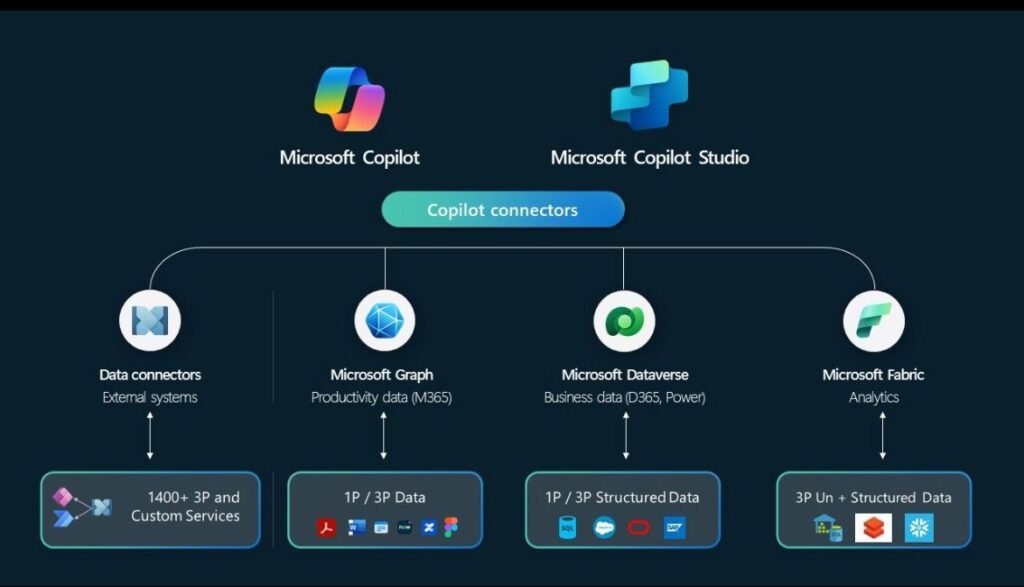
Copilot Studio connects directly with Microsoft’s wider platform, which is a major advantage for organisations already using Microsoft 365.
Integrations include:
- Microsoft Teams — deploy agents as bots within Teams channels
- Microsoft SharePoint — use SharePoint content as a knowledge source
- Microsoft Dataverse — store and access structured business data
- Power Automate (agent flows) — trigger multi-step automated workflows
- Dynamics 365 — connect agents to CRM and ERP data
- Azure AI Search — search across large knowledge bases
Agents can also connect to external systems using over 1,200 pre-built connectors, custom connectors, or REST APIs — giving businesses significant flexibility.
Tools and Actions
In Copilot Studio, “tools” are building blocks that allow agents to interact with external systems and take actions.
You can equip an agent with tools that:
- Send emails via Outlook
- Read or write data in Dataverse
- Post messages in Teams
- Check information from external APIs
- Run automated workflows via agent flows
- Interact with graphical interfaces on screen (Computer Use — generally available)
With generative orchestration active, the agent automatically selects the right tool based on the user’s request — no manual routing required.
Agent Flows (Workflow Automation)
Agent flows are automation workflows built directly inside Copilot Studio. They replace traditional Power Automate flows for agent-related automation.
Benefits of agent flows:
- Consistent execution — rule-based, deterministic behaviour
- Simple creation — build using natural language or a visual designer
- End-to-end visibility — monitor performance inside Copilot Studio’s unified interface
Agent flows can be triggered manually, by conversation events, by schedules, or by other agents. They can include AI-driven actions, approval steps, connector calls, and data operations.
Multi-Agent Systems
Copilot Studio supports multi-agent orchestration. This means you can build systems where one agent hands off work to another — each specialised for a specific task.
For example, a front-line customer service agent could triage a query and then pass it to a specialist billing agent or a technical support agent, depending on the user’s need.
Each child agent manages its own set of tools (up to 128 tools per agent), making this a highly scalable architecture for complex enterprise automation.
How Microsoft Copilot Studio Works
Building an agent in Copilot Studio follows a clear process.
Step 1: Create an AI Agent
Start by opening Copilot Studio and creating a new agent. You can start from scratch, use a pre-built template (such as a customer service agent or website Q&A agent), or build one by describing your needs in natural language.
You define:
- The agent’s name and purpose
- Its primary language
- General instructions for how it should behave
Step 2: Design Conversation Flows (Topics)
Topics are the building blocks of an agent’s conversation. Each topic handles a specific type of user query or task.
With generative orchestration, you give each topic a clear description. The agent uses AI to decide which topic to trigger based on what the user says.
You can author topics using:
- Natural language descriptions
- A visual flow designer with nodes for messages, questions, and conditions
- AI-generated topic structures based on your instructions
Step 3: Connect Data Sources and Tools
Agents become genuinely useful when they can access your business data.
You can connect agents to:
- Documents (Word, PDF, web pages)
- SharePoint libraries
- Dataverse tables
- External APIs via connectors
- Azure AI Search indexes
You also add tools to extend what the agent can do — sending emails, updating records, triggering workflows, and more.
Step 4: Test the Agent
Copilot Studio includes a built-in test chat panel. You can test your agent’s responses in real time, review which topics and tools it selected, and use the activity map to follow the agent’s decision-making process.
Testing in the built-in panel does not consume your Copilot Credit capacity, so you can test freely without incurring usage costs.
Step 5: Deploy the Agent
Once you are satisfied with the agent’s performance, you publish it to one or more channels.
Deployment options include:
- Microsoft Teams (internal use)
- Websites (as a chat widget)
- Microsoft 365 Copilot Chat
- External channels (social platforms, apps, custom websites)
- Internal apps and portals
The deployment options available depend on your licensing. The standalone Copilot Studio licence supports external channels; the Microsoft 365 Copilot licence supports internal Microsoft 365 deployment.
Microsoft Copilot Studio Use Cases
Customer Support Automation
AI agents can handle the most common customer queries automatically — account questions, order status, returns, FAQs — without involving a human agent.
This reduces support ticket volumes, speeds up response times, and allows support teams to focus on complex issues that genuinely need human attention.
Employee Helpdesk
Internal agents can handle IT requests, HR policy questions, and operational queries from employees.
A staff member can ask an agent: “How do I reset my password?” or “What is the parental leave policy?” — and get an instant, accurate answer pulled from your internal knowledge base.
This reduces load on IT and HR teams and improves the employee experience.
Sales Support
Agents can assist sales teams by:
- Surfacing relevant product information
- Qualifying inbound leads by asking structured questions
- Helping reps prepare for meetings with account summaries
- Automating follow-up actions after calls
Organisations like McKinsey & Company and Thomson Reuters have reported significant time savings by deploying agents in client-facing workflows.
Knowledge Management
Large organisations often struggle with information retrieval. Agents connected to SharePoint, Dataverse, and document libraries can help employees find answers quickly — without navigating multiple systems.
Workflow Automation
Agents can trigger multi-step workflows automatically. A user submits a request, the agent collects the necessary information, and an agent flow executes the downstream steps — updating a CRM, sending notifications, generating a report, or routing an approval.
This removes manual steps from repetitive processes and reduces the risk of human error.
Benefits of Microsoft Copilot Studio
Faster AI Development
Traditional AI development takes months. With Copilot Studio, organisations can build and deploy a working agent in days. Pre-built templates, natural language authoring, and AI-driven suggestions significantly accelerate the process.
Reduced Development Costs
Low-code tools reduce dependency on specialist developers. Business analysts, operations managers, and IT generalists can build and maintain agents — without requiring dedicated AI engineering resource.
Improved Productivity
Agents handle repetitive, time-consuming tasks. This frees employees to focus on higher-value work — analysis, decision-making, relationship management — rather than administrative processing.
Better Customer Experience
Faster responses, 24/7 availability, and consistent answers improve the quality of service customers receive. Agents do not get tired, do not forget information, and respond instantly.
Deep Microsoft Integration
For organisations already using Microsoft 365, Teams, or Dynamics 365, Copilot Studio fits naturally into existing infrastructure. There is no need to adopt a separate AI platform or manage complex third-party integrations.
Microsoft Copilot Studio Pricing
Microsoft Copilot Studio uses a credit-based consumption model called Copilot Credits. Credits are consumed whenever an agent completes a task, generates a response, or executes an action.
There are several ways to buy Copilot Studio.
Microsoft 365 Copilot (Included Access)
If your organisation has Microsoft 365 Copilot licences ($30 per user/month), Copilot Studio is included at no extra cost for internal use. Users can build and use agents within Microsoft 365 without separate licensing.
This option is limited to internal deployment. Publishing agents to external channels requires the standalone Copilot Studio licence.
Standalone Copilot Studio — Capacity Pack
The standalone licence is sold per tenant (not per user) as Copilot Credit capacity packs.
- Price: $200 per capacity pack per month
- Capacity: 25,000 Copilot Credits per pack
- Rollover: Unused credits do not roll over to the following month
The number of packs you need depends on how many interactions your agents handle each month.
Pay-As-You-Go
For organisations with variable or unpredictable usage, Microsoft offers a pay-as-you-go meter via Azure.
- Price: $0.01 per Copilot Credit consumed
- Commitment: No upfront commitment required
- Requirement: An active Azure subscription linked to your environment
This option suits organisations just getting started or those with seasonal usage patterns.
Copilot Credit Pre-Purchase Plan (P3)
For larger organisations with predictable, high-volume usage, Microsoft offers a one-year prepaid plan at tiered discounts ranging from 5% to 20% depending on volume.
| Tier | Copilot Credit Commit Units | Price | Discount |
|---|---|---|---|
| 1 | 3,000 | $2,850 | 5% |
| 2 | 15,000 | $14,100 | 6% |
| 3 | 30,000 | $27,900 | 7% |
| 5 | 300,000 | $270,000 | 10% |
| 9 | 3,000,000 | $2,400,000 | 20% |
Each Copilot Credit Commit Unit is worth $1 of usage and converts to 100 Copilot Credits.
Microsoft Agent Pre-Purchase Plan (P3)
A newer option introduced in February 2026, the Microsoft Agent P3 Plan provides a unified prepaid option covering both Copilot Studio and Microsoft Foundry usage — useful for organisations building AI solutions across multiple Microsoft platforms.
Dataverse Storage
Every Copilot Studio licence includes default Dataverse storage:
- Database: 15 GB
- File: 20 GB
- Log: 2 GB
Additional storage can be purchased separately if needed.
Free Trial
Microsoft offers a free trial of Copilot Studio. This is sometimes referred to as the “viral trial” — a self-service sign-up available without contacting Microsoft Sales.
The trial gives you access to core features for a limited period, allowing you to create and test agents using the built-in test panel. However, publishing agents externally is not available during the trial.
Important: The trial enforces strict usage limits — 10 requests per minute and 200 requests per hour per Dataverse environment. Organisations testing at scale should be aware that even a single Teams interaction can trigger multiple backend calls, potentially exhausting these limits quickly.
To explore Copilot Studio without usage restrictions, a paid capacity pack or pay-as-you-go arrangement is recommended.
Copilot Studio vs Traditional Chatbots
Many businesses have tried rule-based chatbots and been disappointed. Here is how Copilot Studio compares.
| Feature | Traditional Chatbots | Microsoft Copilot Studio |
|---|---|---|
| AI capability | Limited, keyword-based | Advanced generative AI |
| Conversation handling | Rigid, scripted paths | Dynamic, context-aware |
| Customisation | Moderate | Highly customisable |
| Workflow automation | Basic or not available | Deep Power Automate integration |
| Microsoft 365 integration | None | Native integration |
| Multi-agent systems | Not supported | Supported |
| No-code building | Partial | Full visual builder |
| External channel deployment | Limited | Web, apps, Teams, social platforms |
| Autonomous task execution | Not available | Supported |
Traditional chatbots are useful for simple, linear conversations. Copilot Studio supports genuinely intelligent agents that can handle complex, multi-step interactions, access live data, and execute actions — all within the Microsoft ecosystem.
Challenges and Limitations
Copilot Studio is powerful, but it is important to approach it with realistic expectations.
Learning Curve
Although it is low-code, there is still a learning curve. Understanding how topics, tools, agent flows, and generative orchestration interact takes time. Teams new to the platform should plan for training and experimentation before going live.
Data Quality Matters
Agents are only as good as the data they access. Poorly structured documents, incomplete knowledge bases, or inconsistent data will produce poor agent responses. Investing in data quality is essential before deploying production agents.
Usage Limits on Free Trials
The viral trial’s strict rate limits (10 requests per minute, 200 per hour) make it unsuitable for anything beyond early-stage testing. Organisations that attempt to test with real users on the trial are likely to hit limits quickly.
Licensing Costs for External Use
Internal use through Microsoft 365 Copilot licences is cost-effective. However, publishing agents to external channels (websites, customer-facing apps) requires standalone Copilot Studio licensing, which adds cost. Organisations should model expected usage volumes before committing to capacity packs.
AI Accuracy Limitations
Generative AI can occasionally produce responses that are incorrect or miss the user’s intent. Microsoft’s generative orchestration is powerful, but agents still require thorough testing and well-written topic descriptions to perform reliably. Overlapping topic descriptions, in particular, can cause the agent to select the wrong response path.
Tool Limits
Agents using generative orchestration support a maximum of 128 tools. Microsoft recommends keeping this to 25–30 tools for best performance. Organisations building highly complex agents should plan their tool architecture carefully.
The Future of AI Agents With Microsoft Copilot Studio
Microsoft has made it clear that agents are central to its AI strategy. At Microsoft Ignite 2024, the company described agents as “the new apps for an AI-powered world” — software that works autonomously on behalf of individuals, teams, and business functions.
Several trends are already emerging:
Autonomous Agents
Copilot Studio now supports autonomous agents — agents that can execute multi-step processes without human prompting. Rather than waiting for a user to ask a question, autonomous agents are triggered by events, schedules, or data changes, and complete tasks independently.
Organisations like Pets at Home, McKinsey & Company, and Thomson Reuters are already using autonomous agents to reduce administrative work by 30–90% in specific workflows.
Multi-Agent Ecosystems
Rather than a single all-purpose agent, organisations are moving towards constellations of specialised agents. Each agent handles a specific function, and they collaborate via Microsoft’s multi-agent orchestration framework.
This mirrors how human teams work — specialists collaborating on complex tasks — and scales AI automation across entire organisations.
Deeper Workflow Integration
As agent flows mature, the boundary between conversational AI and business process automation continues to blur. Agents will increasingly serve as intelligent front-ends to complex, multi-system workflows — taking input from users, executing processes across connected systems, and reporting outcomes back in natural language.
Responsible AI Governance
Microsoft has built governance controls directly into Copilot Studio. Admins can disable specific agent capabilities, restrict publishing, manage data loss prevention policies, and monitor usage through the Power Platform Admin Centre. As autonomous agents become more prevalent, these governance tools will become increasingly important.
How Businesses Can Get Started With Copilot Studio
Getting started does not require a large-scale deployment. The most successful organisations begin small, learn fast, and scale.
Step 1: Identify Automation Opportunities
Start by mapping repetitive, high-volume tasks in your organisation. Common starting points include:
- IT helpdesk queries
- HR policy questions
- Customer FAQs
- Internal knowledge retrieval
Choose a use case with clear business value and manageable scope for your first agent.
Step 2: Evaluate Your Microsoft Environment
Check what Microsoft licences your organisation already has. If you have Microsoft 365 Copilot, you already have access to Copilot Studio for internal use. If you need external deployment, assess the standalone licensing options based on expected usage volume.
Step 3: Build a Pilot Agent
Start with one agent focused on a single, well-defined use case. Use a template if one exists, define clear topics and descriptions, connect the relevant data sources, and test thoroughly before sharing with users.
Step 4: Train Your Teams
Identify the people who will own and maintain agents inside your organisation. These do not need to be developers — but they do need to understand the platform. Microsoft provides training through Microsoft Learn, and specialist partners can provide accelerated training programmes.
Step 5: Scale AI Adoption
Once your pilot is working, expand to additional use cases and departments. Monitor usage data through the Power Platform Admin Centre, gather user feedback, and iterate continuously.
Build AI Agents for Your Organisation With Expert Support
Microsoft Copilot Studio gives organisations the tools to build AI agents, automate workflows, and improve productivity — without needing specialist developers or months of build time.
The platform is genuinely powerful. But getting the most from it requires a clear strategy, the right architecture, and an understanding of how to connect agents to your existing systems and data.
At Copilot Experts, we help organisations do exactly that. Our team can support you with:
- Microsoft Copilot Studio implementation — from initial setup to production deployment
- Custom AI agent development — built around your specific workflows and use cases
- Business workflow automation — connecting agents to your existing Microsoft environment
- Team training — practical, hands-on sessions for the people who will build and maintain your agents
👉 Book a free Copilot consultation today and find out how your organisation can start building AI agents that deliver real results.
Frequently Asked Questions
What is Microsoft Copilot Studio?
Microsoft Copilot Studio is a low-code platform from Microsoft that allows organisations to build, deploy, and manage AI-powered agents. Users can design conversation flows, connect business data, and automate workflows using visual tools — without needing to write code. It integrates with Microsoft 365, Teams, Power Platform, and other Microsoft services.
Can you build AI agents without coding?
Yes. Copilot Studio is designed specifically for low-code and no-code development. Users can build agents using a visual drag-and-drop interface, natural language descriptions, and pre-built templates. Technical teams can extend agents further using connectors, APIs, and custom code, but coding is not required for the majority of agent-building tasks.
What is the difference between Copilot and Copilot Studio?
Microsoft Copilot is an AI assistant built into Microsoft 365 applications — Word, Excel, Teams, Outlook, and others. It helps individual users with tasks like drafting content, summarising meetings, and generating insights.
Copilot Studio is a platform for building AI agents. Organisations use it to create custom agents tailored to their specific workflows, knowledge bases, and business processes. Copilot Studio lets you build agents that other people in your organisation (or your customers) interact with.
Is Copilot Studio part of Microsoft Power Platform?
Yes. Copilot Studio is part of the Microsoft Power Platform alongside Power Apps, Power Automate, Power BI, and Power Pages. It shares the same admin centre, governance controls, and Dataverse infrastructure as the rest of the Power Platform.
How much does Microsoft Copilot Studio cost?
Pricing depends on how you use the platform. For organisations with Microsoft 365 Copilot licences ($30 per user/month), Copilot Studio is included for internal use at no additional cost.
For standalone or external use, pricing is based on Copilot Credits.Capacity packs are available at $200 per month for 25,000 Copilot Credits. A pay-as-you-go option is available at $0.01 per Copilot Credit. Pre-purchase plans offer discounts of up to 20% for high-volume annual commitments.
Is Copilot Studio useful for small and mid-sized businesses?
Yes. Copilot Studio is accessible to businesses of all sizes. The free trial allows small teams to explore the platform with no upfront cost. The pay-as-you-go option means organisations only pay for what they use, making it financially viable for smaller deployments. The low-code interface also means that small teams without dedicated developers can still build and maintain agents.
